Nextpipe overview
Nextpipe (nextpipe) is a Python package that provides a framework
for Decision Workflows modeling and execution. It provides first-class support
for Workflows in the Nextmv Platform.
Info
Please note that Nextpipe is provided as source-available software (not open-source). For further information, please refer to the LICENSE file.
Installation
The library is hosted on PyPI. Python >=3.10. Install using
the Python package manager of your choice:
Concepts
Nextpipe allows you to define complex decision workflows with multiple steps, manage dependencies between these steps, and integrate with external applications and solvers.
Decision workflows are typically lightweight, meaning that they are focused on the orchestration of decision models, and not on the models themselves. A bad practice would be to implement all business logic into the workflow application.
A key advantage of using Nextmv is that you can delegate the compute-heavy logic to individual applications, and you can use infrastructure to parallelize, distribute, and scale the execution of these applications as needed.
Workflows - FlowSpec
Reference
Learn more about the FlowSpec class in the technical reference.
A Workflow in Nextpipe represents a complete pipeline or flow. It's defined
as a Python class that extends FlowSpec:
Steps - @step
Reference
Learn more about the step decorator in the technical reference.
Steps are the fundamental building blocks of a pipeline. Each step is a
function decorated with @step:
@step
def prepare(input: dict):
    """Prepares the data."""
    # Transform input data
    return transformed_data
Steps can process data, make API calls, or perform any computation needed in your pipeline.
Dependencies - @needs
Reference
Learn more about the needs decorator in the technical reference.
Steps can depend on the results of other steps. Use the @needs decorator to
specify dependencies:
@needs(predecessors=[prepare])
@step
def process(data: dict):
    """Process prepared data."""
    return processed_data
When a step has predecessors, the return values from those predecessors are
automatically passed as parameters to the step function. The parameters must
match the order of the predecessors listed in the @needs decorator. For
example:
@step
def step1(input: dict):
    return {"result1": "value1"}

@step
def step2(input: dict):
    return {"result2": "value2"}

@needs(predecessors=[step1, step2])
@step
def process_both(result_from_step1: dict, result_from_step2: dict):
    # result_from_step1 contains {"result1": "value1"}
    # result_from_step2 contains {"result2": "value2"}
    return combined_result
External Applications - @app
Reference
Learn more about the app decorator in the technical reference.
Nextpipe can integrate with external Nextmv applications using the @app
decorator:
@app(app_id="solver-app")
@needs(predecessors=[prepare])
@step
def solve():
    """Run external solver."""
    pass
Note that @app steps don't need a function body - the decorator handles
calling the external application.
Optional Steps - @optional
Reference
Learn more about the optional decorator in the technical reference.
The @optional decorator allows steps to be conditionally executed based on a
provided condition function:
@optional(condition=lambda step: some_condition)
@step
def conditional_step(data: dict):
    """This step only runs when the condition is True."""
    return processed_data
The condition function takes the step as a parameter and should return a boolean indicating whether the step should be executed.
Repeated Execution - @repeat
Reference
Learn more about the repeat decorator in the technical reference.
The @repeat decorator makes a step execute multiple times:
@repeat(repetitions=3)
@step
def repeated_step(input: dict):
    """This step runs 3 times."""
    return processed_data
This is useful when you need to run the same step with different random seeds or configurations multiple times.
Parallel Execution - @foreach
Reference
Learn more about the foreach decorator in the technical reference.
The @foreach decorator enables dynamic fanout, running a successor step for
each item in a list:
@foreach()
@step
def create_scenarios(data: dict):
    """Create multiple scenarios to solve."""
    return [scenario1, scenario2, scenario3]  # Each will be processed separately
Collecting Results - @join
Reference
Learn more about the join decorator in the technical reference.
The @join decorator collects results from previous steps into a list:
@needs(predecessors=[solve])
@join()
@step
def merge(results: list[dict]):
    """Merge results from multiple executions."""
    return merged_result
Dynamically customizing App Runs
Reference
Learn more about the AppRunConfig class in the technical reference.
The AppRunConfig class allows you to dynamically customize app runs.
Particularly, when fanning out steps using the @foreach decorator, you can
pass a list of AppRunConfig objects to specify different configurations for
each run:
from nextpipe.schema import AppRunConfig

@foreach()
@step
def create_scenarios(data: dict):
    """Create multiple scenarios to solve with different configurations."""
    return [
        AppRunConfig(
            name="scenario1",
            input=data,
            options={
                "solve.duration": "5s",
            },
        ),
        AppRunConfig(
            name="scenario2",
            input=data,
            options={
                "solve.duration": "10s",
            },
        ),
    ]

@needs(predecessors=[create_scenarios])
@app(app_id="solver-app")
@step
def solve():
    """Run external solver for each scenario."""
    pass
The AppRunConfig will be applied to each run of the solve step.
An AppRunConfig can also set the execution class and instance of each run. Learn more in
the how-to guide on configuring app runs individually.
Output & visualization
After running a Nextpipe program, the output is composed of the following components:
- Nextpipe logs detailing the execution of the workflow, and information
about the workflow diagram. All of this information is printed to
stderr. - The actual output of the workflow, printed to
stdout.
Nextpipe outputs a Mermaid diagram of the workflow. The diagram is shown as both source and as a link to the rendered diagram.
Consider the following output:
[nextpipe] No application ID or run ID found, uplink is inactive.
[nextpipe] Flow: Workflow
[nextpipe] nextpipe: v0.2.2.dev0
[nextpipe] nextmv: 0.28.0
[nextpipe] Flow graph steps:
[nextpipe] Step:
[nextpipe]   Definition: Step(fetch)
[nextpipe]   Docstring: Fetch CSV data from external source.
[nextpipe] Step:
[nextpipe]   Definition: Step(convert, StepNeeds(fetch))
[nextpipe]   Docstring: Convert CSV data to JSON.
[nextpipe] Step:
[nextpipe]   Definition: Step(align, StepNeeds(convert))
[nextpipe]   Docstring: Align the input data for the solver.
[nextpipe] Step:
[nextpipe]   Definition: Step(solve_nextroute, StepNeeds(convert), StepRepeat(3), StepRun(routing-nextroute, , {'solve.duration': '30s'}, InputType.JSON, True))
[nextpipe]   Docstring: Solve the problem using the Nextroute solver.
[nextpipe] Step:
[nextpipe]   Definition: Step(solve_vroom, StepNeeds(align), StepRun(routing-pyvroom, , {}, InputType.JSON, True))
[nextpipe]   Docstring: Solve the problem using the Vroom solver.
[nextpipe] Step:
[nextpipe]   Definition: Step(solve_ortools, StepNeeds(align), StepRun(routing-ortools, , {}, InputType.JSON, True))
[nextpipe]   Docstring: Solve the problem using the OR-Tools solver.
[nextpipe] Step:
[nextpipe]   Definition: Step(pick_best, StepNeeds(solve_nextroute,solve_vroom,solve_ortools))
[nextpipe]   Docstring: Pick the best solution based on the result value.
[nextpipe] Mermaid diagram:
[nextpipe] graph LR
  fetch(fetch)
  fetch --> convert
  convert(convert)
  convert --> align
  convert --> solve_nextroute
  align(align)
  align --> solve_vroom
  align --> solve_ortools
  solve_nextroute{ }
  solve_nextroute_join{ }
  solve_nextroute_0(solve_nextroute_0)
  solve_nextroute --> solve_nextroute_0
  solve_nextroute_0 --> solve_nextroute_join
  solve_nextroute_1(solve_nextroute_1)
  solve_nextroute --> solve_nextroute_1
  solve_nextroute_1 --> solve_nextroute_join
  solve_nextroute_2(solve_nextroute_2)
  solve_nextroute --> solve_nextroute_2
  solve_nextroute_2 --> solve_nextroute_join
  solve_nextroute_join --> pick_best
  solve_vroom(solve_vroom)
  solve_vroom --> pick_best
  solve_ortools(solve_ortools)
  solve_ortools --> pick_best
  pick_best(pick_best)

[nextpipe] Mermaid URL: https://mermaid.ink/svg/Z3JhcGggTFIKICBmZXRjaChmZXRjaCkKICBmZXRjaCAtLT4gY29udmVydAogIGNvbnZlcnQoY29udmVydCkKICBjb252ZXJ0IC0tPiBhbGlnbgogIGNvbnZlcnQgLS0+IHNvbHZlX25leHRyb3V0ZQogIGFsaWduKGFsaWduKQogIGFsaWduIC0tPiBzb2x2ZV92cm9vbQogIGFsaWduIC0tPiBzb2x2ZV9vcnRvb2xzCiAgc29sdmVfbmV4dHJvdXRleyB9CiAgc29sdmVfbmV4dHJvdXRlX2pvaW57IH0KICBzb2x2ZV9uZXh0cm91dGVfMChzb2x2ZV9uZXh0cm91dGVfMCkKICBzb2x2ZV9uZXh0cm91dGUgLS0+IHNvbHZlX25leHRyb3V0ZV8wCiAgc29sdmVfbmV4dHJvdXRlXzAgLS0+IHNvbHZlX25leHRyb3V0ZV9qb2luCiAgc29sdmVfbmV4dHJvdXRlXzEoc29sdmVfbmV4dHJvdXRlXzEpCiAgc29sdmVfbmV4dHJvdXRlIC0tPiBzb2x2ZV9uZXh0cm91dGVfMQogIHNvbHZlX25leHRyb3V0ZV8xIC0tPiBzb2x2ZV9uZXh0cm91dGVfam9pbgogIHNvbHZlX25leHRyb3V0ZV8yKHNvbHZlX25leHRyb3V0ZV8yKQogIHNvbHZlX25leHRyb3V0ZSAtLT4gc29sdmVfbmV4dHJvdXRlXzIKICBzb2x2ZV9uZXh0cm91dGVfMiAtLT4gc29sdmVfbmV4dHJvdXRlX2pvaW4KICBzb2x2ZV9uZXh0cm91dGVfam9pbiAtLT4gcGlja19iZXN0CiAgc29sdmVfdnJvb20oc29sdmVfdnJvb20pCiAgc29sdmVfdnJvb20gLS0+IHBpY2tfYmVzdAogIHNvbHZlX29ydG9vbHMoc29sdmVfb3J0b29scykKICBzb2x2ZV9vcnRvb2xzIC0tPiBwaWNrX2Jlc3QKICBwaWNrX2Jlc3QocGlja19iZXN0KQo=?theme=dark
[nextpipe] Running node fetch_0
[nextpipe] Running node convert_0
[nextpipe] Running node solve_nextroute_0
[nextpipe] Running node solve_nextroute_1
[nextpipe] Running node solve_nextroute_2
[nextpipe] Running node align_0
[nextpipe] Running node solve_ortools_0
[nextpipe] Running node solve_vroom_0
[nextpipe] Running node pick_best_0
[pick_best_0] routing-nextroute: 11773.762255430222
[pick_best_0] routing-nextroute: 11956.539767503738
[pick_best_0] routing-nextroute: 11919.71020913124
[pick_best_0] routing-pyvroom: 108540.0
[pick_best_0] routing-ortools: 11676.0
{
  "options": {
    "input": "",
    "output": "",
    "duration": 30
  },
  "solution": {
... output truncated ...
As you can observe from the output, Nextpipe automatically generates a Mermaid diagram to visualize the flow structure.
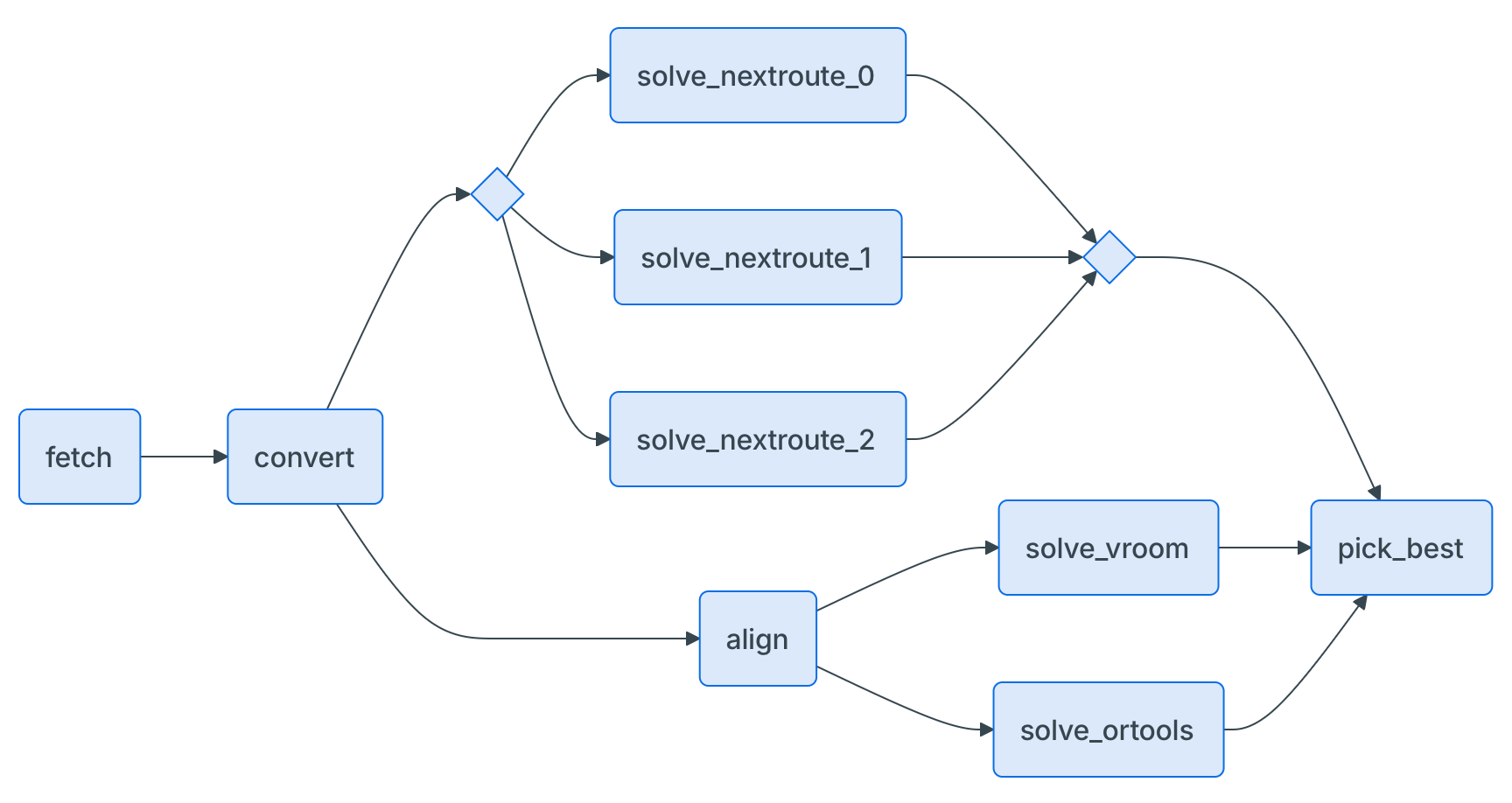
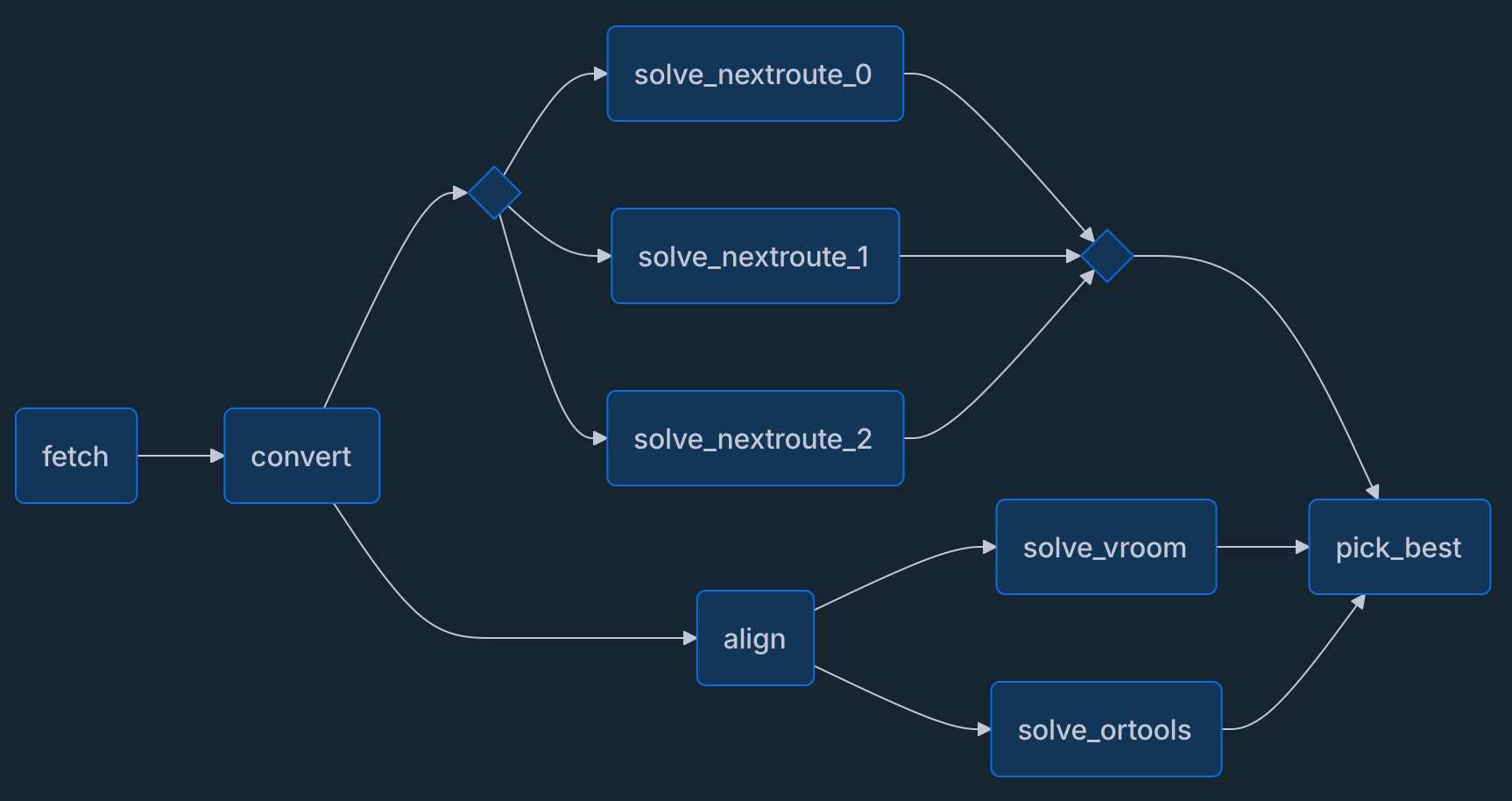
The diagram can be viewed in a browser by following the Mermaid link provided in the output. The diagram shows the flow of data between the steps.