Custom assets
An application run in Nextmv Console has several default views into the data along with the option to add custom views as desired. However, there may be additional data you want to associate with a run that for whatever reason does not necessitate a custom view.
With the custom assets feature you can add this additional data to the output as non-visual assets and the Nextmv Console will extract the data and present it as user-friendly list of file downloads.
A custom asset must follow the schema so that it is recognized and rendered correctly by Nextmv Console.
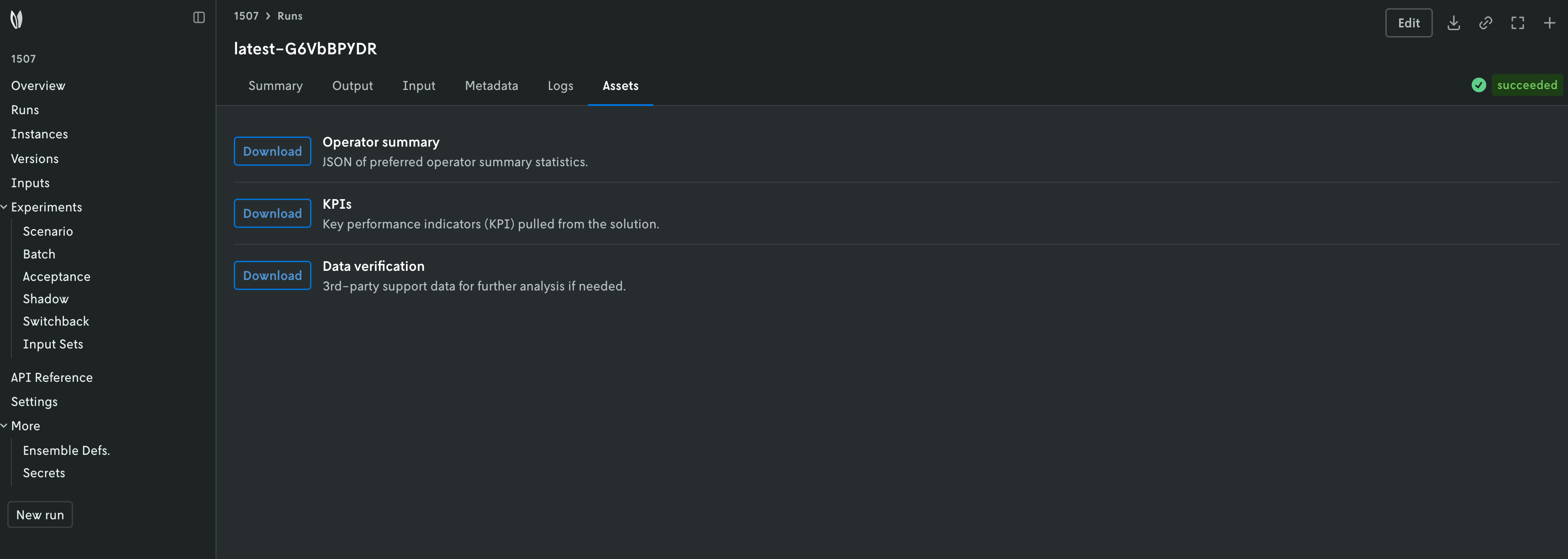
Custom assets are surfaced differently depending on the content format. Please refer to each section for further details.
json: Assets are surfaced under anassetskey in the output.multi-file: Assets are surfaced under a.jsonfile, whose path is specified in theapp.yamlmanifest.
Schema
| Property | Required | Type | Description |
|---|---|---|---|
name |
Yes | string |
Name for the downloadable asset |
content_type |
Yes | string |
Defines the content type of the downloadable asset. For now, only content type json is allowed. |
content |
Yes | object |
This property should contain the content for the downloadable asset. |
description |
No | string |
Any additional information you would like to show to the end user. |
json
In the json content format, a JSON object is
received as output and is written to standard out (stdout). This object
must contain an assets key with the custom assets.
Consider the following example from our python-hello-world community
app. The code is modified to include some custom assets
instead of visual assets. This is the output produced by the application.
import nextmv


def main():
    """Main function that runs the model."""

    # Read the input.
    loaded_input = nextmv.load()
    name = loaded_input.data["name"]
    options = loaded_input.options

    ##### Insert model here

    # Print logs that render in the run view in Nextmv Console.
    message = f"Hello, {name}"
    nextmv.log(message)

    if options.details:
        detail = f"You are {loaded_input.data['distance']} million km from the sun"
        nextmv.log(detail)

    assets = [ # (1)!
        nextmv.Asset(
            name="KPIs",
            description="Key performance indicators (KPI) pulled from the solution.",
            content_type="json",
            content={"data": [0, 1, 2]},
        ),
        nextmv.Asset(
            name="Operator summary",
            description="JSON of preferred operator summary statistics.",
            content_type="json",
            content={"data": [0, 1, 2]},
        ),
        nextmv.Asset(
            name="Data verification",
            description="3rd-party support data for further analysis if needed.",
            content_type="json",
            content={"data": [0, 1, 2]},
        ),
    ]

    # Write output and metrics.
    nextmv.write(
        options=options,
        solution={"message": message},
        metrics={
            "value": 1.23,
            "message": message,
        },
        assets=assets, # (2)!
    )


if __name__ == "__main__":
    main()
- Assets are created using the Python SDK helpers.
- Assets are written to the path specified by the
app.yamlmanifest.
{
  "options": {
    "details": true
  },
  "solution": {
    "message": "Hello, world"
  },
  "assets": [ # (1)!
    {
      "name": "KPIs",
      "content": {
        "data": [
          0,
          1,
          2
        ]
      },
      "content_type": "json",
      "description": "Key performance indicators (KPI) pulled from the solution."
    },
    {
      "name": "Operator summary",
      "content": {
        "data": [
          0,
          1,
          2
        ]
      },
      "content_type": "json",
      "description": "JSON of preferred operator summary statistics."
    },
    {
      "name": "Data verification",
      "content": {
        "data": [
          0,
          1,
          2
        ]
      },
      "content_type": "json",
      "description": "3rd-party support data for further analysis if needed."
    }
  ],
  "metrics": {
    "value": 1.23,
    "message": "Hello, world"
  }
}
- Visual assets are surfaced under an
assetskey in the output.
multi-file
In the multi-file content format one or more
files are written to a location specified in the app.yaml
manifest. A .json file must be written to the path specified in
the configuration.content.multi-file.output.assets property in the
app.yaml. The default value for this property is outputs/assets/assets.json.
Consider the same python-hello-world community app example
as shown in the json section. We are going to modify it to convert it
to the multi-file content format.
type: python
runtime: ghcr.io/nextmv-io/runtime/python:3.11
python:
  pip-requirements: pyproject.toml
files:
  - main.py
configuration:
  content:
    format: multi-file # (1)!
    multi-file:
      input:
        path: inputs
      output:
        solutions: .
        metrics: ./metrics.json
        assets: ./assets.json # (2)!
  options:
    strict: false
    items:
      - name: details
        option_type: bool
        default: true
        description: Print details to logs. Default true.
        required: false
        ui:
          control_type: toggle
          display_name: Details
- Converted the application to
multi-file. - You can customize the path to the assets file.
import nextmv


def main():
    """Main function that runs the model."""

    # Read the input.
    data_file = nextmv.json_data_file(name="input", input_data_key="input")
    loaded_input = nextmv.load(data_files=[data_file])
    input_data = loaded_input.data["input"]
    name = input_data["name"]
    options = loaded_input.options

    ##### Insert model here

    # Print logs that render in the run view in Nextmv Console.
    message = f"Hello, {name}"
    nextmv.log(message)

    if options.details:
        detail = f"You are {input_data['distance']} million km from the sun"
        nextmv.log(detail)

    assets = [ # (1)!
        nextmv.Asset(
            name="KPIs",
            description="Key performance indicators (KPI) pulled from the solution.",
            content_type="json",
            content={"data": [0, 1, 2]},
        ),
        nextmv.Asset(
            name="Operator summary",
            description="JSON of preferred operator summary statistics.",
            content_type="json",
            content={"data": [0, 1, 2]},
        ),
        nextmv.Asset(
            name="Data verification",
            description="3rd-party support data for further analysis if needed.",
            content_type="json",
            content={"data": [0, 1, 2]},
        ),
    ]
    solution_file = nextmv.json_solution_file(name="solution", data={"message": message})

    # Write output and metrics.
    nextmv.write(
        options=options,
        solution_files=[solution_file],
        metrics={
            "value": 1.23,
            "message": message,
        },
        assets=assets, # (2)!
    )


if __name__ == "__main__":
    main()
- Assets are created using the Python SDK helpers.
- Assets are written to the path specified by the
app.yamlmanifest.