Batch experiments
Learn how to run batch experiments with your tool of choice.
- CLI: the Nextmv Command Line Interface (CLI).
- Python SDK: a Software Development Kit (SDK) for Python developers.
- Cloud API: an HTTP API for developers to integrate with the Nextmv platform.
Batch experiments are used to analyze the output from one or more decision models on a fixed input set. They are generally used as an exploratory test to understand the impacts to business metrics (or KPIs) when updating a model with a new feature, such as an additional constraint. They can also be used to validate that a model is ready for further testing and likely to make an intended business impact.
To be concise, batch experiments take the inputs from the input
set and the specified instances and do a run for each
input-instance pair. The results are then aggregated and analyzed. The
decision model must produce an output that contains metrics, so they
can be compared and analyzed.
Info
When working with scenario tests, you can configure two or more scenarios, all with the same input set but with different instances. This achieves the same goal as a batch experiment. The main difference is that scenario tests are more flexible and provide more detailed results.
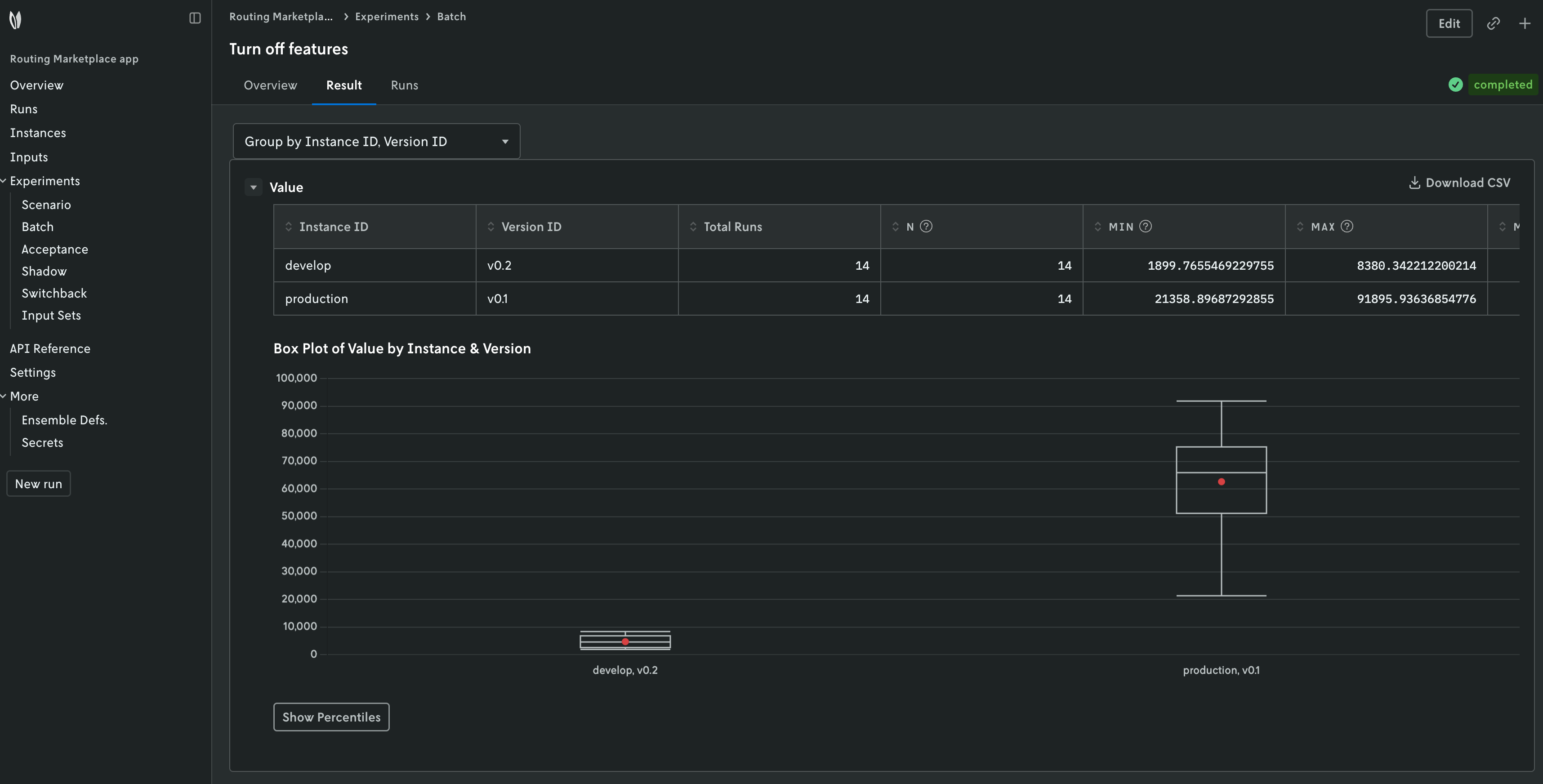
Batch experiments are designed to be visualized in the Nextmv
Console. Go to the app, Experiments > Batch tab.
In addition to an input_set_id and instance_ids, a batch experiment can
process runs and option_sets.
A list of objects.
"runs": [
  {
    "instance_id": "string",
    "version_id": "string",
    "option_set": "string",
    "input_id": "string"
  }
]
Without runs, the batch experiment will run all of the inputs in the input
set on all of the instances. With runs, the batch experiment will only run
the specified inputs on the specified instances. The input_id of a run can
be either a previous run_id or a managed input input_id. The runs list
can also be used to run the same input multiple times on specific instances or versions.
A run can specify an option_set to be used for that run.
A dictionary of objects.
option_sets is a dictionary of options that will be used for a run. An
option set can be referenced in the runs list via its option_set_id.
This can be useful for example if:
- You want to compare the results of different solvers that have conflicting
options. E.g. one uses
solve.durationfor the maximum runtime while the other usesduration. - You want to run specific inputs with different options within the same experiment.
Top-level properties
The table below summarizes the top-level properties when getting batch experiments using the Nextmv CLI, Python SDK or Cloud API.
| Field | Description |
|---|---|
id |
The batch experiment ID that was specified. |
name |
The batch experiment name that was specified. |
description |
The batch experiment description that was specified. If no description was specified this field will not exist. |
status |
The status of the experiment. The status can be: started, completed, or failed. |
created_at |
The date the experiment was created and started. |
input_set_id |
The input set ID specified for the batch experiment. |
instance_ids |
An array of the Instance IDs that were specified for the batch experiment. |
grouped_distributional_summaries |
The grouped distributional summaries is an array that contains the results of the batch experiment. It is a collection of calculated results from the individual runs by certain groupings. |
Grouped distributional summaries
There are three types of summaries included in the
grouped_distributional_summaries array (there could be more in the future):
- Version (instance)
- Version (instance) + input
- Input
Warning
Each type is included for every experiment. However, note that if you are viewing the experiment in Console, ONLY the version summaries are displayed. In the future, Console will display all types of summaries.
No matter the type, each grouped distributional summary includes the following:
| Field | Description |
|---|---|
group_keys |
This describes the type of group distributional summary which can be one of three options: instanceID, versionId (the version summary), inputID, instanceID, versionId (the version & input summary), inputID (the input summary) |
group_values |
The values that correspond to the group_keys. So if the group keys are instanceID and versionID, the group_values will be the ID of the instance and the ID of the version. |
indicator_keys |
These are the metrics that are being evaluated by the batch experiment. |
indicator_distributions |
An object that contains all of the values from the analysis for that particular indicator. If there are six indicator keys for example, the indicator_distributions will contain six object properties, the property key will correspond to the values in the indicator_keys array and each property value will be an object with matching data (see Indicator distributions section below). |
number_of_runs_total |
This is the number of runs that were analyzed for this particular summary. For example, if you ran an experiment with two instances and an input set with three runs, the version summary (instanceID + versionID) will have a run total of three runs because it is running all three input files on that particular version. The version & input summary (instanceID + versionID + inputID) will have one run because it ran that one input file on that particular version. And the input summary (inputID) will have two runs because it ran that input file on the two instances. |
Indicator distributions
Each object property value in the indicator_distributions contains the values
in the table below. Note that for some runs, certain values may be missing (a
custom statistic for example). If you’re viewing the results in Console and a
grouped distributional summary is missing values, a warning message will appear.
If you are analyzing the results from the returned JSON, you must handle this
check in your own systems.
Info
When the runs are being evaluated, the final value is taken from the last solution found before the run has been terminated. The run duration can be set as an option on the experiment or will be set by the executable binary used for the run.
Tip
All values in the indicator distributions are either numbers or strings. If they
are strings, they are one of three string values: nan, +inf, or -inf.
| Field | Description |
|---|---|
min |
The minimum of the values returned from the runs for the statistic being evaluated. For example, if you are viewing the result.custom.used_vehicles indicator distribution, and if there were three runs with one input file returning 50, another 40, and the other 60; the min value would be 40. |
max |
The maximum of the values returned from the runs for the statistic being evaluated. |
count |
The number of successful runs that have the specific indicator in their statistics output. |
mean |
The average of the values returned from the runs for the statistic being evaluated. |
std |
The standard deviation of the values returned from the runs for the statistic being evaluated. Uses a denominator of n−1 (see Corrected sample standard deviation). |
shifted_geometric_mean |
The shifted geometric mean of the values returned from the runs for the statistic being evaluated. (The shift parameter is equal to 10.) |
percentiles |
An object that contains the percentiles of the values returned from the runs for the statistic being evaluated. There are nine values that give the following percentiles: 1%, 5%, 10%, 25%, 50%, 75%, 90%, 95%, and 99%. |