Connect your model to Nextmv with the CLI
⌛️ Approximate time to complete: 20 min.
In this tutorial you will learn how to use the Nextmv CLI to bring your own decision model to the Nextmv Platform, from scratch. Complete this tutorial if you:
- Have a pre-existing decision model and you want to explore the Nextmv Platform.
- Are fluent using a language of your preference, such as C++, Java, Python, etc.
To complete this tutorial, we will use three external examples, working under the principle that they are not Nextmv-created decision models. You can, and should, use your own decision model, or follow along with the examples provided:
- Sudoku authored by FICO® Xpress in Python.
- Simple LP problem authored by HiGHS in C++.
- Vehicle Routing Problem with Pickups and Deliveries authored by OR-Tools in Java.
At a high level, this tutorial will go through the following steps using the examples:
- Nextmv-ify the decision model.
- Push the model to Nextmv Cloud.
- Run the model remotely.
- Perform scenario testing.
You may follow along with the full tutorial code. Let’s dive right in 🤿.
1. Prepare the executable code
Info
If you are working with your own decision model and already know that it executes, feel free to skip this step.
The decision model is composed of executable code that solves an optimization problem. Copy the desired example code to a script named:
main.pyfor the Xpress example.main.cppfor the HiGHS example.src/main/java/com/google/ortools/constraintsolver/samples/VrpPickupDelivery.javafor the OR-Tools example.
import xpress as xp

q = 3

starting_grid = [
    [8, 0, 0, 0, 0, 0, 0, 0, 0],
    [0, 0, 3, 6, 0, 0, 0, 0, 0],
    [0, 7, 0, 0, 9, 0, 2, 0, 0],
    [0, 5, 0, 0, 0, 7, 0, 0, 0],
    [0, 0, 0, 0, 4, 5, 7, 0, 0],
    [0, 0, 0, 1, 0, 0, 0, 3, 0],
    [0, 0, 1, 0, 0, 0, 0, 6, 8],
    [0, 0, 8, 5, 0, 0, 0, 1, 0],
    [0, 9, 0, 0, 0, 0, 4, 0, 0],
]

n = q**2  # the size must be the square of the size of the subgrids
N = range(n)

p = xp.problem()

x = p.addVariables(N, N, N, vartype=xp.binary)

# define all q^2 subgrids
subgrids = {
    (h, l): [(i, j) for i in range(q * h, q * h + q) for j in range(q * l, q * l + q)]
    for h in range(q)
    for l in range(q)
}

vertical = [xp.Sum(x[i, j, k] for i in N) == 1 for j in N for k in N]
horizontal = [xp.Sum(x[i, j, k] for j in N) == 1 for i in N for k in N]
subgrid = [
    xp.Sum(x[i, j, k] for (i, j) in subgrids[h, l]) == 1
    for (h, l) in subgrids.keys()
    for k in N
]

# Assign exactly one number to each cell

assign = [xp.Sum(x[i, j, k] for k in N) == 1 for i in N for j in N]

init = [
    x[i, j, k] == 1 for k in N for i in N for j in N if starting_grid[i][j] == k + 1
]

p.addConstraint(vertical, horizontal, subgrid, assign, init)

p.optimize()

print("Solution:")

for i in N:
    for j in N:
        l = [k for k in N if p.getSolution(x[i, j, k]) >= 0.5]
        assert len(l) == 1
        print("{0:2d}".format(1 + l[0]), end="", sep="")
    print("")
// HiGHS is designed to solve linear optimization problems of the form
//
// Min (1/2)x^TQx + c^Tx + d subject to L <= Ax <= U; l <= x <= u
//
// where A is a matrix with m rows and n columns, and Q is either zero
// or positive definite. If Q is zero, HiGHS can determine the optimal
// integer-valued solution.
//
// The scalar n is num_col_
// The scalar m is num_row_
//
// The vector c is col_cost_
// The scalar d is offset_
// The vector l is col_lower_
// The vector u is col_upper_
// The vector L is row_lower_
// The vector U is row_upper_
//
// The matrix A is represented in packed vector form, either
// row-wise or column-wise: only its nonzeros are stored
//
// * The number of nonzeros in A is num_nz
//
// * The indices of the nonnzeros in the vectors of A are stored in a_index
//
// * The values of the nonnzeros in the vectors of A are stored in a_value
//
// * The position in a_index/a_value of the index/value of the first
// nonzero in each vector is stored in a_start
//
// Note that a_start[0] must be zero
//
// The matrix Q is represented in packed column form
//
// * The dimension of Q is dim_
//
// * The number of nonzeros in Q is hessian_num_nz
//
// * The indices of the nonnzeros in the vectors of A are stored in q_index
//
// * The values of the nonnzeros in the vectors of A are stored in q_value
//
// * The position in q_index/q_value of the index/value of the first
// nonzero in each column is stored in q_start
//
// Note
//
// * By default, Q is zero. This is indicated by dim_ being initialised to zero.
//
// * q_start[0] must be zero
//
#include <cassert>

#include "Highs.h"

using std::cout;
using std::endl;

int main() {
  // Create and populate a HighsModel instance for the LP
  //
  // Min    f  =  x_0 +  x_1 + 3
  // s.t.                x_1 <= 7
  //        5 <=  x_0 + 2x_1 <= 15
  //        6 <= 3x_0 + 2x_1
  // 0 <= x_0 <= 4; 1 <= x_1
  //
  // Although the first constraint could be expressed as an upper
  // bound on x_1, it serves to illustrate a non-trivial packed
  // column-wise matrix.
  //
  HighsModel model;
  model.lp_.num_col_ = 2;
  model.lp_.num_row_ = 3;
  model.lp_.sense_ = ObjSense::kMinimize;
  model.lp_.offset_ = 3;
  model.lp_.col_cost_ = {1.0, 1.0};
  model.lp_.col_lower_ = {0.0, 1.0};
  model.lp_.col_upper_ = {4.0, 1.0e30};
  model.lp_.row_lower_ = {-1.0e30, 5.0, 6.0};
  model.lp_.row_upper_ = {7.0, 15.0, 1.0e30};
  //
  // Here the orientation of the matrix is column-wise
  model.lp_.a_matrix_.format_ = MatrixFormat::kColwise;
  // a_start_ has num_col_1 entries, and the last entry is the number
  // of nonzeros in A, allowing the number of nonzeros in the last
  // column to be defined
  model.lp_.a_matrix_.start_ = {0, 2, 5};
  model.lp_.a_matrix_.index_ = {1, 2, 0, 1, 2};
  model.lp_.a_matrix_.value_ = {1.0, 3.0, 1.0, 2.0, 2.0};
  //
  // Create a Highs instance
  Highs highs;
  HighsStatus return_status;
  //
  // Pass the model to HiGHS
  return_status = highs.passModel(model);
  assert(return_status == HighsStatus::kOk);
  // If a user passes a model with entries in
  // model.lp_.a_matrix_.value_ less than (the option)
  // small_matrix_value in magnitude, they will be ignored. A logging
  // message will indicate this, and passModel will return
  // HighsStatus::kWarning
  //
  // Get a const reference to the LP data in HiGHS
  const HighsLp& lp = highs.getLp();
  //
  // Solve the model
  return_status = highs.run();
  assert(return_status == HighsStatus::kOk);
  //
  // Get the model status
  const HighsModelStatus& model_status = highs.getModelStatus();
  assert(model_status == HighsModelStatus::kOptimal);
  cout << "Model status: " << highs.modelStatusToString(model_status) << endl;
  //
  // Get the solution information
  const HighsInfo& info = highs.getInfo();
  cout << "Simplex iteration count: " << info.simplex_iteration_count << endl;
  cout << "Objective function value: " << info.objective_function_value << endl;
  cout << "Primal  solution status: "
       << highs.solutionStatusToString(info.primal_solution_status) << endl;
  cout << "Dual    solution status: "
       << highs.solutionStatusToString(info.dual_solution_status) << endl;
  cout << "Basis: " << highs.basisValidityToString(info.basis_validity) << endl;
  const bool has_values = info.primal_solution_status;
  const bool has_duals = info.dual_solution_status;
  const bool has_basis = info.basis_validity;
  //
  // Get the solution values and basis
  const HighsSolution& solution = highs.getSolution();
  const HighsBasis& basis = highs.getBasis();
  //
  // Report the primal and solution values and basis
  for (int col = 0; col < lp.num_col_; col++) {
    cout << "Column " << col;
    if (has_values) cout << "; value = " << solution.col_value[col];
    if (has_duals) cout << "; dual = " << solution.col_dual[col];
    if (has_basis)
      cout << "; status: " << highs.basisStatusToString(basis.col_status[col]);
    cout << endl;
  }
  for (int row = 0; row < lp.num_row_; row++) {
    cout << "Row    " << row;
    if (has_values) cout << "; value = " << solution.row_value[row];
    if (has_duals) cout << "; dual = " << solution.row_dual[row];
    if (has_basis)
      cout << "; status: " << highs.basisStatusToString(basis.row_status[row]);
    cout << endl;
  }

  // Now indicate that all the variables must take integer values
  model.lp_.integrality_.resize(lp.num_col_);
  for (int col = 0; col < lp.num_col_; col++)
    model.lp_.integrality_[col] = HighsVarType::kInteger;

  highs.passModel(model);
  // Solve the model
  return_status = highs.run();
  assert(return_status == HighsStatus::kOk);
  // Report the primal solution values
  for (int col = 0; col < lp.num_col_; col++) {
    cout << "Column " << col;
    if (info.primal_solution_status)
      cout << "; value = " << solution.col_value[col];
    cout << endl;
  }
  for (int row = 0; row < lp.num_row_; row++) {
    cout << "Row    " << row;
    if (info.primal_solution_status)
      cout << "; value = " << solution.row_value[row];
    cout << endl;
  }

  highs.resetGlobalScheduler(true);

  return 0;
}
package com.google.ortools.constraintsolver.samples;

import com.google.ortools.Loader;
import com.google.ortools.constraintsolver.Assignment;
import com.google.ortools.constraintsolver.FirstSolutionStrategy;
import com.google.ortools.constraintsolver.RoutingDimension;
import com.google.ortools.constraintsolver.RoutingIndexManager;
import com.google.ortools.constraintsolver.RoutingModel;
import com.google.ortools.constraintsolver.RoutingSearchParameters;
import com.google.ortools.constraintsolver.Solver;
import com.google.ortools.constraintsolver.main;
import java.util.logging.Logger;

/** Minimal Pickup & Delivery Problem (PDP).*/
public class VrpPickupDelivery {
  private static final Logger logger = Logger.getLogger(VrpPickupDelivery.class.getName());

  static class DataModel {
    public final long[][] distanceMatrix = {
        {0, 548, 776, 696, 582, 274, 502, 194, 308, 194, 536, 502, 388, 354, 468, 776, 662},
        {548, 0, 684, 308, 194, 502, 730, 354, 696, 742, 1084, 594, 480, 674, 1016, 868, 1210},
        {776, 684, 0, 992, 878, 502, 274, 810, 468, 742, 400, 1278, 1164, 1130, 788, 1552, 754},
        {696, 308, 992, 0, 114, 650, 878, 502, 844, 890, 1232, 514, 628, 822, 1164, 560, 1358},
        {582, 194, 878, 114, 0, 536, 764, 388, 730, 776, 1118, 400, 514, 708, 1050, 674, 1244},
        {274, 502, 502, 650, 536, 0, 228, 308, 194, 240, 582, 776, 662, 628, 514, 1050, 708},
        {502, 730, 274, 878, 764, 228, 0, 536, 194, 468, 354, 1004, 890, 856, 514, 1278, 480},
        {194, 354, 810, 502, 388, 308, 536, 0, 342, 388, 730, 468, 354, 320, 662, 742, 856},
        {308, 696, 468, 844, 730, 194, 194, 342, 0, 274, 388, 810, 696, 662, 320, 1084, 514},
        {194, 742, 742, 890, 776, 240, 468, 388, 274, 0, 342, 536, 422, 388, 274, 810, 468},
        {536, 1084, 400, 1232, 1118, 582, 354, 730, 388, 342, 0, 878, 764, 730, 388, 1152, 354},
        {502, 594, 1278, 514, 400, 776, 1004, 468, 810, 536, 878, 0, 114, 308, 650, 274, 844},
        {388, 480, 1164, 628, 514, 662, 890, 354, 696, 422, 764, 114, 0, 194, 536, 388, 730},
        {354, 674, 1130, 822, 708, 628, 856, 320, 662, 388, 730, 308, 194, 0, 342, 422, 536},
        {468, 1016, 788, 1164, 1050, 514, 514, 662, 320, 274, 388, 650, 536, 342, 0, 764, 194},
        {776, 868, 1552, 560, 674, 1050, 1278, 742, 1084, 810, 1152, 274, 388, 422, 764, 0, 798},
        {662, 1210, 754, 1358, 1244, 708, 480, 856, 514, 468, 354, 844, 730, 536, 194, 798, 0},
    };
    public final int[][] pickupsDeliveries = {
        {1, 6},
        {2, 10},
        {4, 3},
        {5, 9},
        {7, 8},
        {15, 11},
        {13, 12},
        {16, 14},
    };
    public final int vehicleNumber = 4;
    public final int depot = 0;
  }

  /// @brief Print the solution.
  static void printSolution(
      DataModel data, RoutingModel routing, RoutingIndexManager manager, Assignment solution) {
    // Solution cost.
    logger.info("Objective : " + solution.objectiveValue());
    // Inspect solution.
    long totalDistance = 0;
    for (int i = 0; i < data.vehicleNumber; ++i) {
      if (!routing.isVehicleUsed(solution, i)) {
        continue;
      }
      long index = routing.start(i);
      logger.info("Route for Vehicle " + i + ":");
      long routeDistance = 0;
      String route = "";
      while (!routing.isEnd(index)) {
        route += manager.indexToNode(index) + " -> ";
        long previousIndex = index;
        index = solution.value(routing.nextVar(index));
        routeDistance += routing.getArcCostForVehicle(previousIndex, index, i);
      }
      logger.info(route + manager.indexToNode(index));
      logger.info("Distance of the route: " + routeDistance + "m");
      totalDistance += routeDistance;
    }
    logger.info("Total Distance of all routes: " + totalDistance + "m");
  }

  public static void main(String[] args) throws Exception {
    Loader.loadNativeLibraries();
    // Instantiate the data problem.
    final DataModel data = new DataModel();

    // Create Routing Index Manager
    RoutingIndexManager manager =
        new RoutingIndexManager(data.distanceMatrix.length, data.vehicleNumber, data.depot);

    // Create Routing Model.
    RoutingModel routing = new RoutingModel(manager);

    // Create and register a transit callback.
    final int transitCallbackIndex =
        routing.registerTransitCallback((long fromIndex, long toIndex) -> {
          // Convert from routing variable Index to user NodeIndex.
          int fromNode = manager.indexToNode(fromIndex);
          int toNode = manager.indexToNode(toIndex);
          return data.distanceMatrix[fromNode][toNode];
        });

    // Define cost of each arc.
    routing.setArcCostEvaluatorOfAllVehicles(transitCallbackIndex);

    // Add Distance constraint.
    boolean unused = routing.addDimension(transitCallbackIndex, // transit callback index
        0, // no slack
        3000, // vehicle maximum travel distance
        true, // start cumul to zero
        "Distance");
    RoutingDimension distanceDimension = routing.getMutableDimension("Distance");
    distanceDimension.setGlobalSpanCostCoefficient(100);

    // Define Transportation Requests.
    Solver solver = routing.solver();
    for (int[] request : data.pickupsDeliveries) {
      long pickupIndex = manager.nodeToIndex(request[0]);
      long deliveryIndex = manager.nodeToIndex(request[1]);
      routing.addPickupAndDelivery(pickupIndex, deliveryIndex);
      solver.addConstraint(
          solver.makeEquality(routing.vehicleVar(pickupIndex), routing.vehicleVar(deliveryIndex)));
      solver.addConstraint(solver.makeLessOrEqual(
          distanceDimension.cumulVar(pickupIndex), distanceDimension.cumulVar(deliveryIndex)));
    }

    // Setting first solution heuristic.
    RoutingSearchParameters searchParameters =
        main.defaultRoutingSearchParameters()
            .toBuilder()
            .setFirstSolutionStrategy(FirstSolutionStrategy.Value.PARALLEL_CHEAPEST_INSERTION)
            .build();

    // Solve the problem.
    Assignment solution = routing.solveWithParameters(searchParameters);

    // Print solution on console.
    printSolution(data, routing, manager, solution);
  }
}
2. Set up requirements
Info
If you are working with your own decision model and already have all requirements ready for it, feel free to skip this step.
The examples require different setups. These are the requirements that you need before compiling and running the examples.
2.1. Xpress
If you are following along with the full tutorial code,
you should be using the original directory. In that case, run the following
command in the root of your project.
On the other hand, if you are completing this tutorial from scratch, run the following command in the root of your project.
2.2. HiGHS
Stand at the root of the project where you placed the main.cpp file.
-
Make sure you can run
g++(C++ compiler). -
Make sure you can run
cmake(CMake build system). -
Clone HiGHS from GitHub to build the solver.
-
Build HiGHS, the solver itself.
-
After building, a
./HiGHS/build/libdirectory should exist with the necessary libraries.
2.3. OR-Tools
Stand at the root of the project where you placed the src directory.
-
Make sure you can run
java(JDK 11 or higher). -
Make sure you can run
mvn(Maven). -
Create a
pom.xmlfile to manage dependencies.pom.xml<?xml version="1.0" encoding="UTF-8"?> <project xmlns="http://maven.apache.org/POM/4.0.0" xmlns:xsi="http://www.w3.org/2001/XMLSchema-instance" xsi:schemaLocation="http://maven.apache.org/POM/4.0.0 http://maven.apache.org/xsd/maven-4.0.0.xsd"> <modelVersion>4.0.0</modelVersion> <groupId>com.google.ortools</groupId> <artifactId>vrp-pickup-delivery</artifactId> <version>1.0-SNAPSHOT</version> <packaging>jar</packaging> <name>VRP Pickup Delivery</name> <description>Vehicle Routing Problem with Pickup and Delivery using OR-Tools</description> <properties> <project.build.sourceEncoding>UTF-8</project.build.sourceEncoding> <maven.compiler.source>11</maven.compiler.source> <maven.compiler.target>11</maven.compiler.target> <ortools.version>9.8.3296</ortools.version> </properties> <dependencies> <!-- OR-Tools dependency --> <dependency> <groupId>com.google.ortools</groupId> <artifactId>ortools-java</artifactId> <version>${ortools.version}</version> </dependency> </dependencies> <build> <plugins> <!-- Maven Compiler Plugin --> <plugin> <groupId>org.apache.maven.plugins</groupId> <artifactId>maven-compiler-plugin</artifactId> <version>3.11.0</version> <configuration> <source>11</source> <target>11</target> </configuration> </plugin> <!-- Maven Exec Plugin for running the application --> <plugin> <groupId>org.codehaus.mojo</groupId> <artifactId>exec-maven-plugin</artifactId> <version>3.1.0</version> <configuration> <mainClass>com.google.ortools.constraintsolver.samples.VrpPickupDelivery</mainClass> </configuration> </plugin> <!-- Maven Shade Plugin for creating an executable JAR --> <plugin> <groupId>org.apache.maven.plugins</groupId> <artifactId>maven-shade-plugin</artifactId> <version>3.5.1</version> <executions> <execution> <phase>package</phase> <goals> <goal>shade</goal> </goals> <configuration> <createDependencyReducedPom>false</createDependencyReducedPom> <shadedArtifactAttached>false</shadedArtifactAttached> <outputDirectory>.</outputDirectory> <finalName>main</finalName> <transformers> <transformer implementation="org.apache.maven.plugins.shade.resource.ManifestResourceTransformer"> <mainClass> com.google.ortools.constraintsolver.samples.VrpPickupDelivery</mainClass> </transformer> </transformers> </configuration> </execution> </executions> </plugin> </plugins> </build> </project>
3. Compile and run the executable code
Info
If you are working with your own decision model and already know that it executes, feel free to skip this step.
These are the steps for compiling and running the examples.
3.1. Xpress
Stand at the root of the project where you placed the main.py file. Execute
the following command to run the code.
FICO Xpress v9.9.1, Community, solve started 11:02:39, Jul 9, 2026
Heap usage: 755KB (peak 755KB, 58KB system)
Minimizing MILP noname using up to 10 threads and up to 32GB memory, with these control settings:
OUTPUTLOG = 1
NLPPOSTSOLVE = 1
XSLP_DELETIONCONTROL = 0
XSLP_OBJSENSE = 1
Original problem has:
      345 rows          729 cols         2937 elements       729 entities
Presolved problem has:
      141 rows          201 cols          595 elements       201 entities
LP relaxation tightened
Presolve finished in 0 seconds
Heap usage: 2355KB (peak 2355KB, 58KB system)

Coefficient range                    original                 solved
  Coefficients   [min,max] : [ 1.00e+00,  1.00e+00] / [ 1.00e+00,  1.00e+00]
  RHS and bounds [min,max] : [ 1.00e+00,  1.00e+00] / [ 1.00e+00,  1.00e+00]
  Objective      [min,max] : [      0.0,       0.0] / [      0.0,       0.0]
Autoscaling applied standard scaling

Will try to keep branch and bound tree memory usage below 30.3GB
Starting concurrent solve with dual (1 thread)

Concurrent-Solve,   0s
            Dual
    objective   dual inf

------- optimal --------
Concurrent statistics:
          Dual: 207 simplex iterations, 0.00s
Optimal solution found

  Its         Obj Value      S   Ninf  Nneg        Sum Inf  Time
  207           .000000      P      0     0        .000000     0
Dual solved problem
  207 simplex iterations in 0.00 seconds at time 0

Final objective                       : 0.000000000000000e+00
  Max primal violation      (abs/rel) :       0.0 /       0.0
  Max dual violation        (abs/rel) :       0.0 /       0.0
  Max complementarity viol. (abs/rel) :       0.0 /       0.0

Starting root cutting & heuristics
Deterministic mode with up to 4 additional threads

Its Type    BestSoln    BestBound   Sols    Add    Del     Gap     GInf   Time
P             .000000      .000000      1               0.0e+00        0      0
STOPPING - MIPRELSTOP target reached (MIPRELSTOP=0.0001  gap=0).
*** Search completed ***
Uncrunching matrix
Final MIP objective                   : 0.000000000000000e-01
Final MIP bound                       : 0.000000000000000e-01
  Solution time / primaldual integral :      0.02s/ 98.601964%
  Work / work units per second        :      0.02 /      1.20
  Number of solutions found / nodes   :         1 /         0
  Max primal violation      (abs/rel) :       0.0 /       0.0
  Max integer violation     (abs    ) :       0.0
Solution:
8 1 2 7 5 3 6 4 9
9 4 3 6 8 2 1 7 5
6 7 5 4 9 1 2 8 3
1 5 4 2 3 7 8 9 6
3 6 9 8 4 5 7 2 1
2 8 7 1 6 9 5 3 4
5 2 1 9 7 4 3 6 8
4 3 8 5 2 6 9 1 7
7 9 6 3 1 8 4 5 2
3.2. HiGHS
Stand at the root of the project where you placed the main.cpp file.
-
Execute the following command to compile the code.
-
A
./mainbinary should have been created. -
Execute the following command to run the code.
Running HiGHS 1.12.0 (git hash: 869cbd4df): Copyright (c) 2025 HiGHS under MIT licence terms
Cols:           1 upper bounds greater than or equal to        1e+20 are treated as +Infinity
Rows:           1 lower bounds    less than or equal to       -1e+20 are treated as -Infinity
Rows:           1 upper bounds greater than or equal to        1e+20 are treated as +Infinity
LP has 3 rows; 2 cols; 5 nonzeros
Coefficient ranges:
  Matrix  [1e+00, 3e+00]
  Cost    [1e+00, 1e+00]
  Bound   [1e+00, 4e+00]
  RHS     [5e+00, 2e+01]
Presolving model
2 rows, 2 cols, 4 nonzeros  0s
2 rows, 2 cols, 4 nonzeros  0s
Presolve reductions: rows 2(-1); columns 2(-0); nonzeros 4(-1)
Solving the presolved LP
Using EKK dual simplex solver - serial
  Iteration        Objective     Infeasibilities num(sum)
          0     4.0000013886e+00 Pr: 2(7) 0s
          2     5.7500000000e+00 Pr: 0(0) 0s

Performed postsolve
Solving the original LP from the solution after postsolve

Model status        : Optimal
Simplex   iterations: 2
Objective value     :  5.7500000000e+00
P-D objective error :  0.0000000000e+00
HiGHS run time      :          0.00
Model status: Optimal
Simplex iteration count: 2
Objective function value: 5.75
Primal  solution status: Feasible
Dual    solution status: Feasible
Basis: Valid
Column 0; value = 0.5; dual = 0; status: Basic
Column 1; value = 2.25; dual = 0; status: Basic
Row    0; value = 2.25; dual = -0; status: Basic
Row    1; value = 5; dual = 0.25; status: At lower/fixed bound
Row    2; value = 6; dual = 0.25; status: At lower/fixed bound
Cols:           1 upper bounds greater than or equal to        1e+20 are treated as +Infinity
Rows:           1 lower bounds    less than or equal to       -1e+20 are treated as -Infinity
Rows:           1 upper bounds greater than or equal to        1e+20 are treated as +Infinity
MIP has 3 rows; 2 cols; 5 nonzeros; 2 integer variables (0 binary)
Coefficient ranges:
  Matrix  [1e+00, 3e+00]
  Cost    [1e+00, 1e+00]
  Bound   [1e+00, 4e+00]
  RHS     [5e+00, 2e+01]
Presolving model
2 rows, 2 cols, 4 nonzeros  0s
2 rows, 2 cols, 4 nonzeros  0s
Presolve reductions: rows 2(-1); columns 2(-0); nonzeros 4(-1)
Objective function is integral with scale 1

Solving MIP model with:
  2 rows
  2 cols (0 binary, 2 integer, 0 implied int., 0 continuous, 0 domain fixed)
  4 nonzeros

Src: B => Branching; C => Central rounding; F => Feasibility pump; H => Heuristic;
    I => Shifting; J => Feasibility jump; L => Sub-MIP; P => Empty MIP; R => Randomized rounding;
    S => Solve LP; T => Evaluate node; U => Unbounded; X => User solution; Y => HiGHS solution;
    Z => ZI Round; l => Trivial lower; p => Trivial point; u => Trivial upper; z => Trivial zero

        Nodes      |    B&B Tree     |            Objective Bounds              |  Dynamic Constraints |       Work
Src  Proc. InQueue |  Leaves   Expl. | BestBound       BestSol              Gap |   Cuts   InLp Confl. | LpIters     Time

u       0       0         0   0.00%   -inf            9                  Large        0      0      0         0     0.0s
J       0       0         0 100.00%   -inf            6                  Large        0      0      0         0     0.0s
        1       0         1 100.00%   6               6                  0.00%        0      0      0         0     0.0s

Solving report
  Status            Optimal
  Primal bound      6
  Dual bound        6
  Gap               0% (tolerance: 0.01%)
  P-D integral      2.22166818276e-07
  Solution status   feasible
                    6 (objective)
                    0 (bound viol.)
                    0 (int. viol.)
                    0 (row viol.)
  Timing            0.01
  Max sub-MIP depth 0
  Nodes             1
  Repair LPs        0
  LP iterations     0
Column 0; value = -0
Column 1; value = 3
Row    0; value = 3
Row    1; value = 6
Row    2; value = 6
3.3. OR-Tools
Stand at the root of the project where you placed the src directory.
-
Execute the following command to compile the code.
-
A
./main.jarfile should have been created. -
Execute the following command to run the code.
Nov 26, 2025 1:26:43 PM com.google.ortools.constraintsolver.samples.VrpPickupDelivery printSolution
INFO: Objective : 226116
Nov 26, 2025 1:26:43 PM com.google.ortools.constraintsolver.samples.VrpPickupDelivery printSolution
INFO: Route for Vehicle 0:
Nov 26, 2025 1:26:43 PM com.google.ortools.constraintsolver.samples.VrpPickupDelivery printSolution
INFO: 0 -> 13 -> 15 -> 11 -> 12 -> 0
Nov 26, 2025 1:26:43 PM com.google.ortools.constraintsolver.samples.VrpPickupDelivery printSolution
INFO: Distance of the route: 1552m
Nov 26, 2025 1:26:43 PM com.google.ortools.constraintsolver.samples.VrpPickupDelivery printSolution
INFO: Route for Vehicle 1:
Nov 26, 2025 1:26:43 PM com.google.ortools.constraintsolver.samples.VrpPickupDelivery printSolution
INFO: 0 -> 5 -> 2 -> 10 -> 16 -> 14 -> 9 -> 0
Nov 26, 2025 1:26:43 PM com.google.ortools.constraintsolver.samples.VrpPickupDelivery printSolution
INFO: Distance of the route: 2192m
Nov 26, 2025 1:26:43 PM com.google.ortools.constraintsolver.samples.VrpPickupDelivery printSolution
INFO: Route for Vehicle 2:
Nov 26, 2025 1:26:43 PM com.google.ortools.constraintsolver.samples.VrpPickupDelivery printSolution
INFO: 0 -> 4 -> 3 -> 0
Nov 26, 2025 1:26:43 PM com.google.ortools.constraintsolver.samples.VrpPickupDelivery printSolution
INFO: Distance of the route: 1392m
Nov 26, 2025 1:26:43 PM com.google.ortools.constraintsolver.samples.VrpPickupDelivery printSolution
INFO: Route for Vehicle 3:
Nov 26, 2025 1:26:43 PM com.google.ortools.constraintsolver.samples.VrpPickupDelivery printSolution
INFO: 0 -> 7 -> 1 -> 6 -> 8 -> 0
Nov 26, 2025 1:26:43 PM com.google.ortools.constraintsolver.samples.VrpPickupDelivery printSolution
INFO: Distance of the route: 1780m
Nov 26, 2025 1:26:43 PM com.google.ortools.constraintsolver.samples.VrpPickupDelivery printSolution
INFO: Total Distance of all routes: 6916m
4. Nextmv-ify the decision model
We are going to turn the executable decision model into a Nextmv application.
Tip
Go to the Applications section to learn more about Nextmv applications.
We are going to adapt the examples so that they can follow the conventions of a Nextmv application, such as:
- The app receives one, or more, inputs (problem data) through
stdinor files. - The app run can be configured through options that are received as CLI arguments.
- The app processes the inputs, and executes the decision model.
- The app produces one, or more, outputs (solutions) and prints to
stdoutor files. - The app optionally produces metrics and assets (can be visual, like charts).
Start by adding the app.yaml file, which is known as the app
manifest, to the root of the project. This file contains the
configuration of the app.
type: python
runtime: ghcr.io/nextmv-io/runtime/python:3.11
files:
  - main.py
python:
  pip-requirements: pyproject.toml # Can be a requirements.txt
configuration:
  content:
    format: json
  options:
    items:
      - name: duration
        description: Duration for the solver, in seconds.
        required: false
        option_type: float
        default: 1
        additional_attributes:
          min: 0
          max: 10
          step: 1
        ui:
          control_type: slider
type: binary
runtime: ghcr.io/nextmv-io/runtime/default:latest
files:
  - main
  - HiGHS/build/lib/
build:
  command: bash ./build.sh
execution:
  entrypoint: main
configuration:
  content:
    format: json
  options:
    items:
      - name: duration
        description: Duration for the solver, in seconds.
        required: false
        option_type: float
        default: 1
        additional_attributes:
          min: 0
          max: 10
          step: 1
        ui:
          control_type: slider
type: java
runtime: ghcr.io/nextmv-io/runtime/java:latest
files:
  - main.jar
build:
  command: mvn clean package
execution:
  entrypoint: main.jar
configuration:
  content:
    format: multi-file
    multi-file:
      input:
        path: inputs
      output:
        solutions: outputs/solutions
        metrics: outputs/metrics.json
        assets: outputs/assets.json
  options:
    items:
      - name: vehicle_maximum_travel_distance
        description: Maximum travel distance for each vehicle, in meters.
        required: false
        option_type: float
        default: 3000
        additional_attributes:
          min: 10
          max: 10000
          step: 100
        ui:
          control_type: slider
      - name: global_span_cost_coefficient
        description: Coefficient for the global span cost in the objective function.
        required: false
        option_type: float
        default: 100
        additional_attributes:
          min: 1
          max: 10000
          step: 10
        ui:
          control_type: slider
This tutorial is not meant to discuss the app manifest in-depth, for that you can go to the manifest docs. However, these are the main attributes shown in the manifests:
type: the examples demonstrate different types of applications.runtime: Xpress uses thepythonruntime, HiGHS usesdefaultto execute binaries, and OR-Tools uses thejavaruntime to execute Java applications.build.command: specifies in some cases the command to build the executable code. We are going to compile an artifact for HiGHS and OR-Tools.execution.entrypoint: specifies the executable code to run.files: contains files that make up the executable code of the app. For Xpress we need themain.py, for HiGHS we are including themainbinary and the required libraries, and finally for OR-Tools, we are including themain.jarfile.python.pip-requirements: specifies for Xpress the file with the Python packages that need to be installed for the application.configuration.content: Xpress and HiGHS will use thejsonformat, so they do not need additional configurations. OR-Tools will usemulti-file, so additional configurations are needed. As you complete this tutorial, the difference between the two formats will become clearer.configuration.options: for the examples we are adding options to the application, which allow you to configure runs, with parameters such as solver duration.
Now, you can overwrite your decision model files with the Nextmv-ified version.
import nextmv
import xpress as xp

input = nextmv.load()
q = input.data["q"]
starting_grid = input.data["starting_grid"]

n = q**2  # the size must be the square of the size of the subgrids
N = range(n)

nextmv.redirect_stdout()  # Solver chatter is logged to stderr.

p = xp.problem()
p.setControl("timelimit", input.options.duration)

x = p.addVariables(N, N, N, vartype=xp.binary)

# define all q^2 subgrids
subgrids = {
    (h, l): [(i, j) for i in range(q * h, q * h + q) for j in range(q * l, q * l + q)]
    for h in range(q)
    for l in range(q)
}

vertical = [xp.Sum(x[i, j, k] for i in N) == 1 for j in N for k in N]
horizontal = [xp.Sum(x[i, j, k] for j in N) == 1 for i in N for k in N]
subgrid = [
    xp.Sum(x[i, j, k] for (i, j) in subgrids[h, l]) == 1
    for (h, l) in subgrids.keys()
    for k in N
]

# Assign exactly one number to each cell

assign = [xp.Sum(x[i, j, k] for k in N) == 1 for i in N for j in N]

init = [
    x[i, j, k] == 1 for k in N for i in N for j in N if starting_grid[i][j] == k + 1
]

p.addConstraint(vertical, horizontal, subgrid, assign, init)

p.optimize()

print("Solution:")
solution = {}
rows = []
for i in N:
    row = []
    for j in N:
        l = [k for k in N if p.getSolution(x[i, j, k]) >= 0.5]
        assert len(l) == 1
        value = 1 + l[0]
        row.append(value)
        print("{0:2d}".format(value), end="", sep="")
    rows.append(row)
    print("")

for i, row in enumerate(rows):
    solution[f"row_{i}"] = row

metrics = {
    "duration": p.attributes.time,
    "objective": p.attributes.objval,
    "num_variables": p.attributes.cols,
    "num_constraints": p.attributes.rows,
}

nextmv.write(solution=solution, metrics=metrics, options=input.options)
// HiGHS is designed to solve linear optimization problems of the form
//
// Min (1/2)x^TQx + c^Tx + d subject to L <= Ax <= U; l <= x <= u
//
// where A is a matrix with m rows and n columns, and Q is either zero
// or positive definite. If Q is zero, HiGHS can determine the optimal
// integer-valued solution.
//
// The scalar n is num_col_
// The scalar m is num_row_
//
// The vector c is col_cost_
// The scalar d is offset_
// The vector l is col_lower_
// The vector u is col_upper_
// The vector L is row_lower_
// The vector U is row_upper_
//
// The matrix A is represented in packed vector form, either
// row-wise or column-wise: only its nonzeros are stored
//
// * The number of nonzeros in A is num_nz
//
// * The indices of the nonnzeros in the vectors of A are stored in a_index
//
// * The values of the nonnzeros in the vectors of A are stored in a_value
//
// * The position in a_index/a_value of the index/value of the first
// nonzero in each vector is stored in a_start
//
// Note that a_start[0] must be zero
//
// The matrix Q is represented in packed column form
//
// * The dimension of Q is dim_
//
// * The number of nonzeros in Q is hessian_num_nz
//
// * The indices of the nonnzeros in the vectors of A are stored in q_index
//
// * The values of the nonnzeros in the vectors of A are stored in q_value
//
// * The position in q_index/q_value of the index/value of the first
// nonzero in each column is stored in q_start
//
// Note
//
// * By default, Q is zero. This is indicated by dim_ being initialised to zero.
//
// * q_start[0] must be zero
//
#include <cassert>
#include <chrono>
#include <fstream>
#include <iostream>
#include <string>

#include "Highs.h"
#include "nlohmann/json.hpp"

#include <sstream>
#include <vector>

using std::cout;
using std::endl;
using json = nlohmann::json;

int main(int argc, char* argv[]) {
  // Start timing
  auto start_time = std::chrono::high_resolution_clock::now();

  // Parse command line arguments for time_limit
  double time_limit = 0.0;  // 0 means no limit
  for (int i = 1; i < argc; i++) {
    std::string arg = argv[i];
    if (arg.find("--time_limit=") == 0) {
      time_limit = std::stod(arg.substr(13));
    } else if (arg == "--time_limit" && i + 1 < argc) {
      time_limit = std::stod(argv[++i]);
    }
  }

  // Read and parse JSON from stdin
  json j;
  try {
    std::cin >> j;
  } catch (const json::parse_error& e) {
    std::cerr << "Error: Failed to parse JSON input: " << e.what() << std::endl;
    return 1;
  }

  if (j.empty()) {
    std::cerr << "Error: No input provided on stdin" << std::endl;
    return 1;
  }

  // Parse the JSON and create the model
  HighsModel model;
  model.lp_.num_col_ = j["num_col"].get<int>();
  model.lp_.num_row_ = j["num_row"].get<int>();
  model.lp_.sense_ = ObjSense::kMinimize;
  model.lp_.offset_ = j.value("offset", 0.0);
  model.lp_.col_cost_ = j["col_cost"].get<std::vector<double>>();
  model.lp_.col_lower_ = j["col_lower"].get<std::vector<double>>();
  model.lp_.col_upper_ = j["col_upper"].get<std::vector<double>>();
  model.lp_.row_lower_ = j["row_lower"].get<std::vector<double>>();
  model.lp_.row_upper_ = j["row_upper"].get<std::vector<double>>();

  // Parse the a_matrix object
  const auto& matrix = j["a_matrix"];

  // Set matrix format from JSON
  std::string format = matrix["format"].get<std::string>();
  if (format == "rowwise") {
    model.lp_.a_matrix_.format_ = MatrixFormat::kRowwise;
  } else {
    model.lp_.a_matrix_.format_ = MatrixFormat::kColwise;
  }
  model.lp_.a_matrix_.start_ = matrix["start"].get<std::vector<int>>();
  model.lp_.a_matrix_.index_ = matrix["index"].get<std::vector<int>>();
  model.lp_.a_matrix_.value_ = matrix["value"].get<std::vector<double>>();
  //
  // Create a Highs instance
  Highs highs;
  HighsStatus return_status;

  // Suppress HiGHS output
  highs.setOptionValue("output_flag", false);
  highs.setOptionValue("log_to_console", false);

  // Set time limit if provided
  if (time_limit > 0.0) {
    highs.setOptionValue("time_limit", time_limit);
    std::cerr << "Time limit set to " << time_limit << " seconds" << endl;
  }
  //
  // Pass the model to HiGHS
  return_status = highs.passModel(model);
  assert(return_status == HighsStatus::kOk);
  // If a user passes a model with entries in
  // model.lp_.a_matrix_.value_ less than (the option)
  // small_matrix_value in magnitude, they will be ignored. A logging
  // message will indicate this, and passModel will return
  // HighsStatus::kWarning
  //
  // Get a const reference to the LP data in HiGHS
  const HighsLp& lp = highs.getLp();
  //
  // Solve the model
  return_status = highs.run();
  assert(return_status == HighsStatus::kOk);
  //
  // Get the model status
  const HighsModelStatus& model_status = highs.getModelStatus();
  assert(model_status == HighsModelStatus::kOptimal);
  std::cerr << "Model status: " << highs.modelStatusToString(model_status) << endl;
  //
  // Get the solution information
  const HighsInfo& info = highs.getInfo();
  std::cerr << "Simplex iteration count: " << info.simplex_iteration_count << endl;
  std::cerr << "Objective function value: " << info.objective_function_value << endl;
  std::cerr << "Primal  solution status: "
       << highs.solutionStatusToString(info.primal_solution_status) << endl;
  std::cerr << "Dual    solution status: "
       << highs.solutionStatusToString(info.dual_solution_status) << endl;
  std::cerr << "Basis: " << highs.basisValidityToString(info.basis_validity) << endl;
  const bool has_values = info.primal_solution_status;
  const bool has_duals = info.dual_solution_status;
  const bool has_basis = info.basis_validity;
  //
  // Get the solution values and basis
  const HighsSolution& solution = highs.getSolution();
  const HighsBasis& basis = highs.getBasis();
  //
  // Report the primal and solution values and basis to stderr
  for (int col = 0; col < lp.num_col_; col++) {
    std::cerr << "Column " << col;
    if (has_values) std::cerr << "; value = " << solution.col_value[col];
    if (has_duals) std::cerr << "; dual = " << solution.col_dual[col];
    if (has_basis)
      std::cerr << "; status: " << highs.basisStatusToString(basis.col_status[col]);
    std::cerr << endl;
  }
  for (int row = 0; row < lp.num_row_; row++) {
    std::cerr << "Row    " << row;
    if (has_values) std::cerr << "; value = " << solution.row_value[row];
    if (has_duals) std::cerr << "; dual = " << solution.row_dual[row];
    if (has_basis)
      std::cerr << "; status: " << highs.basisStatusToString(basis.row_status[row]);
    std::cerr << endl;
  }

  // Now indicate that all the variables must take integer values from JSON
  if (j.contains("integrality")) {
    std::vector<int> integrality = j["integrality"].get<std::vector<int>>();
    if (!integrality.empty()) {
      model.lp_.integrality_.resize(lp.num_col_);
      for (int col = 0; col < lp.num_col_; col++)
        model.lp_.integrality_[col] = integrality[col] == 1 ? HighsVarType::kInteger : HighsVarType::kContinuous;
    }
  }

  highs.passModel(model);
  // Solve the model
  return_status = highs.run();
  assert(return_status == HighsStatus::kOk);

  // Calculate duration
  auto end_time = std::chrono::high_resolution_clock::now();
  std::chrono::duration<double> duration = end_time - start_time;

  // Build output JSON
  json output;

  // Add solution columns
  json columns = json::array();
  for (int col = 0; col < lp.num_col_; col++) {
    json column_obj;
    column_obj["index"] = col;
    if (info.primal_solution_status) {
      column_obj["value"] = solution.col_value[col];
    }
    columns.push_back(column_obj);
  }

  // Add solution rows
  json rows = json::array();
  for (int row = 0; row < lp.num_row_; row++) {
    json row_obj;
    row_obj["index"] = row;
    if (info.primal_solution_status) {
      row_obj["value"] = solution.row_value[row];
    }
    rows.push_back(row_obj);
  }

  // Build complete output structure
  output["solution"]["columns"] = columns;
  output["solution"]["rows"] = rows;
  output["metrics"]["objective_value"] = info.objective_function_value;
  output["metrics"]["duration"] = duration.count();
  output["metrics"]["simplex_iteration_count"] = info.simplex_iteration_count;
  output["metrics"]["status"] = highs.modelStatusToString(model_status);

  // Output formatted JSON to stdout
  cout << output.dump(2) << endl;

  highs.resetGlobalScheduler(true);

  return 0;
}
package com.google.ortools.constraintsolver.samples;

import com.google.gson.Gson;
import com.google.gson.JsonObject;
import com.google.ortools.Loader;
import com.google.ortools.constraintsolver.Assignment;
import com.google.ortools.constraintsolver.FirstSolutionStrategy;
import com.google.ortools.constraintsolver.RoutingDimension;
import com.google.ortools.constraintsolver.RoutingIndexManager;
import com.google.ortools.constraintsolver.RoutingModel;
import com.google.ortools.constraintsolver.RoutingSearchParameters;
import com.google.ortools.constraintsolver.Solver;
import com.google.ortools.constraintsolver.main;
import java.io.File;
import java.io.FileReader;
import java.io.FileWriter;
import java.io.IOException;
import java.util.ArrayList;
import java.util.List;
import java.util.logging.Logger;

/** Minimal Pickup & Delivery Problem (PDP).*/
public class VrpPickupDelivery {
  private static final Logger logger = Logger.getLogger(VrpPickupDelivery.class.getName());

  static class DataModel {
    public long[][] distanceMatrix;
    public int[][] pickupsDeliveries;
    public int vehicleNumber;
    public int depot;

    public static DataModel loadFromFiles(String distanceFile, String pickupsDeliveriesFile, String problemFile) throws IOException {
      DataModel data = new DataModel();
      Gson gson = new Gson();

      // Load distance matrix
      try (FileReader reader = new FileReader(distanceFile)) {
        data.distanceMatrix = gson.fromJson(reader, long[][].class);
      }

      // Load pickups and deliveries
      try (FileReader reader = new FileReader(pickupsDeliveriesFile)) {
        data.pickupsDeliveries = gson.fromJson(reader, int[][].class);
      }

      // Load problem configuration
      try (FileReader reader = new FileReader(problemFile)) {
        JsonObject problemConfig = gson.fromJson(reader, JsonObject.class);
        data.vehicleNumber = problemConfig.get("vehicleNumber").getAsInt();
        data.depot = problemConfig.get("depot").getAsInt();
      }

      return data;
    }
  }

  static class Route {
    public int vehicle;
    public List<Integer> stops;
    public long distance;

    public Route(int vehicle, List<Integer> stops, long distance) {
      this.vehicle = vehicle;
      this.stops = stops;
      this.distance = distance;
    }
  }

  static class Solution {
    public List<Route> routes;

    public Solution(List<Route> routes) {
      this.routes = routes;
    }
  }

  static class SolutionOutput {
    public Solution solution;

    public SolutionOutput(Solution solution) {
      this.solution = solution;
    }
  }

  /// @brief Save the solution to a JSON file.
  static long saveSolutionToFile(
      DataModel data, RoutingModel routing, RoutingIndexManager manager, Assignment solution, String outputFile) throws IOException {
    List<Route> routes = new ArrayList<>();
    long totalDistance = 0;

    for (int i = 0; i < data.vehicleNumber; ++i) {
      if (!routing.isVehicleUsed(solution, i)) {
        continue;
      }

      List<Integer> stops = new ArrayList<>();
      long index = routing.start(i);
      long routeDistance = 0;

      while (!routing.isEnd(index)) {
        stops.add(manager.indexToNode(index));
        long previousIndex = index;
        index = solution.value(routing.nextVar(index));
        routeDistance += routing.getArcCostForVehicle(previousIndex, index, i);
      }
      stops.add(manager.indexToNode(index)); // Add final stop

      routes.add(new Route(i, stops, routeDistance));
      totalDistance += routeDistance;
    }

    Solution solutionData = new Solution(routes);
    SolutionOutput output = new SolutionOutput(solutionData);

    // Create output directory if it doesn't exist
    File file = new File(outputFile);
    file.getParentFile().mkdirs();

    // Write to JSON file
    Gson gson = new Gson();
    try (FileWriter writer = new FileWriter(outputFile)) {
      gson.toJson(output, writer);
    }

    logger.info("Solution saved to " + outputFile);
    return totalDistance;
  }

  /// @brief Save the metrics to a JSON file.
  static void saveMetricsToFile(
      double objectiveValue, double durationSeconds, long totalDistance, int totalRoutes, String outputFile) throws IOException {
    java.util.Map<String, Object> metrics = new java.util.LinkedHashMap<>();
    metrics.put("objective_value", objectiveValue);
    metrics.put("duration_seconds", durationSeconds);
    metrics.put("total_distance", totalDistance);
    metrics.put("total_routes", totalRoutes);

    // Create output directory if it doesn't exist
    File file = new File(outputFile);
    file.getParentFile().mkdirs();

    // Write to JSON file
    Gson gson = new Gson();
    try (FileWriter writer = new FileWriter(outputFile)) {
      gson.toJson(metrics, writer);
    }

    logger.info("Metrics saved to " + outputFile);
  }

  /// @brief Print the solution.
  static void printSolution(
      DataModel data, RoutingModel routing, RoutingIndexManager manager, Assignment solution) {
    // Solution cost.
    logger.info("Objective : " + solution.objectiveValue());
    // Inspect solution.
    long totalDistance = 0;
    for (int i = 0; i < data.vehicleNumber; ++i) {
      if (!routing.isVehicleUsed(solution, i)) {
        continue;
      }
      long index = routing.start(i);
      logger.info("Route for Vehicle " + i + ":");
      long routeDistance = 0;
      String route = "";
      while (!routing.isEnd(index)) {
        route += manager.indexToNode(index) + " -> ";
        long previousIndex = index;
        index = solution.value(routing.nextVar(index));
        routeDistance += routing.getArcCostForVehicle(previousIndex, index, i);
      }
      logger.info(route + manager.indexToNode(index));
      logger.info("Distance of the route: " + routeDistance + "m");
      totalDistance += routeDistance;
    }
    logger.info("Total Distance of all routes: " + totalDistance + "m");
  }

  public static void main(String[] args) throws Exception {
    Loader.loadNativeLibraries();

    // Parse command line arguments
    int vehicleMaximumTravelDistance = 3000; // default value
    int globalSpanCostCoefficient = 100; // default value
    for (int i = 0; i < args.length; i++) {
      if (args[i].equals("--vehicle_maximum_travel_distance") && i + 1 < args.length) {
        vehicleMaximumTravelDistance = Integer.parseInt(args[i + 1]);
      } else if (args[i].equals("--global_span_cost_coefficient") && i + 1 < args.length) {
        globalSpanCostCoefficient = Integer.parseInt(args[i + 1]);
      }
    }

    // Define input file paths
    String distanceFile = "inputs/distance.json";
    String pickupsDeliveriesFile = "inputs/pickups_deliveries.json";
    String problemFile = "inputs/problem.json";

    // Load the data from JSON files
    final DataModel data = DataModel.loadFromFiles(distanceFile, pickupsDeliveriesFile, problemFile);

    // Create Routing Index Manager
    RoutingIndexManager manager =
        new RoutingIndexManager(data.distanceMatrix.length, data.vehicleNumber, data.depot);

    // Create Routing Model.
    RoutingModel routing = new RoutingModel(manager);

    // Create and register a transit callback.
    final int transitCallbackIndex =
        routing.registerTransitCallback((long fromIndex, long toIndex) -> {
          // Convert from routing variable Index to user NodeIndex.
          int fromNode = manager.indexToNode(fromIndex);
          int toNode = manager.indexToNode(toIndex);
          return data.distanceMatrix[fromNode][toNode];
        });

    // Define cost of each arc.
    routing.setArcCostEvaluatorOfAllVehicles(transitCallbackIndex);

    // Add Distance constraint.
    boolean unused = routing.addDimension(transitCallbackIndex, // transit callback index
        0, // no slack
        vehicleMaximumTravelDistance, // vehicle maximum travel distance
        true, // start cumul to zero
        "Distance");
    RoutingDimension distanceDimension = routing.getMutableDimension("Distance");
    distanceDimension.setGlobalSpanCostCoefficient(globalSpanCostCoefficient);

    // Define Transportation Requests.
    Solver solver = routing.solver();
    for (int[] request : data.pickupsDeliveries) {
      long pickupIndex = manager.nodeToIndex(request[0]);
      long deliveryIndex = manager.nodeToIndex(request[1]);
      routing.addPickupAndDelivery(pickupIndex, deliveryIndex);
      solver.addConstraint(
          solver.makeEquality(routing.vehicleVar(pickupIndex), routing.vehicleVar(deliveryIndex)));
      solver.addConstraint(solver.makeLessOrEqual(
          distanceDimension.cumulVar(pickupIndex), distanceDimension.cumulVar(deliveryIndex)));
    }

    // Setting first solution heuristic.
    RoutingSearchParameters searchParameters =
        main.defaultRoutingSearchParameters()
            .toBuilder()
            .setFirstSolutionStrategy(FirstSolutionStrategy.Value.PARALLEL_CHEAPEST_INSERTION)
            .build();

    // Solve the problem and track duration.
    long startTime = System.nanoTime();
    Assignment solution = routing.solveWithParameters(searchParameters);
    long endTime = System.nanoTime();
    double durationSeconds = (endTime - startTime) / 1_000_000_000.0;

    // Print solution on console.
    printSolution(data, routing, manager, solution);

    // Save solution to JSON file and get total distance.
    String outputFile = "outputs/solutions/solution.json";
    long totalDistance = saveSolutionToFile(data, routing, manager, solution, outputFile);

    // Count total routes used.
    int totalRoutes = 0;
    for (int i = 0; i < data.vehicleNumber; ++i) {
      if (routing.isVehicleUsed(solution, i)) {
        totalRoutes++;
      }
    }

    // Save metrics to JSON file.
    String metricsFile = "outputs/metrics.json";
    double objectiveValue = solution.objectiveValue();
    saveMetricsToFile(objectiveValue, durationSeconds, totalDistance, totalRoutes, metricsFile);
  }
}
This is a short summary of the changes introduced for each of the examples:
- Added a dependency for
nextmv, the Python SDK for Nextmv. - Load the app manifest from the
app.yamlfile. - Extract options (configurations) from the manifest.
- The input data is no longer in the Python file itself. We will move it to a
file under
inputs/input.json. In a singlejsonfile we will define the complete input. Given that we are working with thejsoncontent format, we use the Python SDK to load the input data fromstdin. - Write the solution to the problem, and solver metrics, to
stdout, given that we are working with thejsoncontent format.
- Added parsing of command line arguments to extract options.
- Added reading of input data from
stdin, injsonformat. - Modified the model definition to use the loaded input data.
- Store the solution to the problem, and solver metrics (statistics), in an output.
- Write the output to
stdout, given that we are working with thejsoncontent format.
- Added parsing of command line arguments to extract options.
- The input data is no longer in the Java file itself. We are representing
the problem with several files under the
inputsdirectory. Ininputs/distance.jsonwe are going to write the distance matrix. Ininputs/pickups_deliveries.jsonwe are going to set the information about the precedence of stops, defining pickup-delivery pairs. Ininputs/problem.jsonwe are storing additional information about the problem. When working with more than one file, themulti-filecontent format is ideal. - Modified the model definition to use the loaded input data.
- Write the output to several files, under the
outputsdirectory, given that we are working with themulti-filecontent format.
Here are the data files that you need to place in an inputs directory.
{
  "starting_grid": [
    [8, 0, 0, 0, 0, 0, 0, 0, 0],
    [0, 0, 3, 6, 0, 0, 0, 0, 0],
    [0, 7, 0, 0, 9, 0, 2, 0, 0],
    [0, 5, 0, 0, 0, 7, 0, 0, 0],
    [0, 0, 0, 0, 4, 5, 7, 0, 0],
    [0, 0, 0, 1, 0, 0, 0, 3, 0],
    [0, 0, 1, 0, 0, 0, 0, 6, 8],
    [0, 0, 8, 5, 0, 0, 0, 1, 0],
    [0, 9, 0, 0, 0, 0, 4, 0, 0]
  ],
  "q": 3
}
{
  "num_col": 2,
  "num_row": 3,
  "offset": 3,
  "col_cost": [1.0, 1.0],
  "col_lower": [0.0, 1.0],
  "col_upper": [4.0, 1.0e30],
  "row_lower": [-1.0e30, 5.0, 6.0],
  "row_upper": [7.0, 15.0, 1.0e30],
  "a_matrix": {
    "format": "colwise",
    "start": [0, 2, 5],
    "index": [1, 2, 0, 1, 2],
    "value": [1.0, 3.0, 1.0, 2.0, 2.0]
  },
  "integrality": [1, 1]
}
[
  [
    0, 548, 776, 696, 582, 274, 502, 194, 308, 194, 536, 502, 388, 354, 468,
    776, 662
  ],
  [
    548, 0, 684, 308, 194, 502, 730, 354, 696, 742, 1084, 594, 480, 674, 1016,
    868, 1210
  ],
  [
    776, 684, 0, 992, 878, 502, 274, 810, 468, 742, 400, 1278, 1164, 1130, 788,
    1552, 754
  ],
  [
    696, 308, 992, 0, 114, 650, 878, 502, 844, 890, 1232, 514, 628, 822, 1164,
    560, 1358
  ],
  [
    582, 194, 878, 114, 0, 536, 764, 388, 730, 776, 1118, 400, 514, 708, 1050,
    674, 1244
  ],
  [
    274, 502, 502, 650, 536, 0, 228, 308, 194, 240, 582, 776, 662, 628, 514,
    1050, 708
  ],
  [
    502, 730, 274, 878, 764, 228, 0, 536, 194, 468, 354, 1004, 890, 856, 514,
    1278, 480
  ],
  [
    194, 354, 810, 502, 388, 308, 536, 0, 342, 388, 730, 468, 354, 320, 662,
    742, 856
  ],
  [
    308, 696, 468, 844, 730, 194, 194, 342, 0, 274, 388, 810, 696, 662, 320,
    1084, 514
  ],
  [
    194, 742, 742, 890, 776, 240, 468, 388, 274, 0, 342, 536, 422, 388, 274,
    810, 468
  ],
  [
    536, 1084, 400, 1232, 1118, 582, 354, 730, 388, 342, 0, 878, 764, 730, 388,
    1152, 354
  ],
  [
    502, 594, 1278, 514, 400, 776, 1004, 468, 810, 536, 878, 0, 114, 308, 650,
    274, 844
  ],
  [
    388, 480, 1164, 628, 514, 662, 890, 354, 696, 422, 764, 114, 0, 194, 536,
    388, 730
  ],
  [
    354, 674, 1130, 822, 708, 628, 856, 320, 662, 388, 730, 308, 194, 0, 342,
    422, 536
  ],
  [
    468, 1016, 788, 1164, 1050, 514, 514, 662, 320, 274, 388, 650, 536, 342, 0,
    764, 194
  ],
  [
    776, 868, 1552, 560, 674, 1050, 1278, 742, 1084, 810, 1152, 274, 388, 422,
    764, 0, 798
  ],
  [
    662, 1210, 754, 1358, 1244, 708, 480, 856, 514, 468, 354, 844, 730, 536,
    194, 798, 0
  ]
]
Aside from the app.yaml manifest file, the code changes, and the introduction
of the inputs directory, we need to make some more minor adjustments.
4.1. Xpress
We need to add a dependency for nextmv (the Nextmv Python SDK).
This dependency is optional, and the modeling
constructs are not needed to run a Nextmv Application
locally. However, using the SDK modeling features makes it easier to work with
Nextmv apps, as a lot of convenient functionality is already baked in.
Run the following command to add the nextmv dependency to your project.
After you are done Nextmv-ifying, your Nextmv app should have the following structure, for the example provided:
Now you are ready to explore the Nextmv Platform 🥳.
4.2. HiGHS
-
Given we introduced the
nlohmann/jsonlibrary for JSON parsing and writing, we need to get the library. -
When we push the Nextmv application to Cloud, we need to cross-compile for Linux ARM64. To do this, we can use Docker. Add the following
Dockerfileto the root of your Nextmv application.DockerfileFROM ubuntu:22.04 # Install build dependencies. RUN apt-get update && apt-get install -y \ build-essential \ cmake \ git \ curl \ && rm -rf /var/lib/apt/lists/* # Set working directory. WORKDIR /app # Build HiGHS. RUN git clone https://github.com/ERGO-Code/HiGHS.git WORKDIR /app/HiGHS RUN cmake -S. -B build RUN cmake --build build --parallel # Download nlohmann/json header. WORKDIR /app RUN mkdir -p nlohmann RUN curl -L https://github.com/nlohmann/json/releases/download/v3.11.3/json.hpp \ -o nlohmann/json.hpp # Copy source code. COPY main.cpp /app/ # Compile the application. RUN g++ -std=c++11 main.cpp -o main \ -I. \ -I./HiGHS/highs \ -I./HiGHS/build \ -L./HiGHS/build/lib -lhighs -
In the
app.yamlmanifest, we specified abuild.shscript that will run before pushing the app. This script will cross-compile the necessary dependencies and the binary so that it is ready to run in the Nextmv Platform.build.sh#!/bin/bash set -euo pipefail # Prepare Docker environment docker rm -f highs-solver || true # Build the Docker image docker buildx build -f Dockerfile -t highs-solver --platform linux/arm64 --load . # Extract the compiled binary from the container docker run --name highs-solver --platform linux/arm64 highs-solver docker cp highs-solver:/app/main ./main echo "🐰 Binary extracted to ./main" mkdir -p HiGHS/build docker cp highs-solver:/app/HiGHS/build/lib ./HiGHS/build echo "🐰 Required libraries extracted to ./HiGHS/build/lib" docker rm highs-solver echo "🐰 Build completed successfully."
After you are done Nextmv-ifying, your Nextmv app should have the following structure for this example.
.
├── app.yaml
├── build.sh
├── Dockerfile
├── HiGHS
│   ├── ... More stuff
│   └── build
│       └── lib
│           ├── libhighs.1.12.dylib
│           ├── libhighs.1.dylib -> libhighs.1.12.dylib
│           ├── libhighs.dylib -> libhighs.1.dylib
│           ├── libhighs.so -> libhighs.so.1
│           ├── libhighs.so.1 -> libhighs.so.1.12.0
│           └── libhighs.so.1.12.0
├── inputs
│   └── problem.json
├── main.cpp
├── nlohmann
│   └── json.hpp
└── README.md
Now you are ready to explore the Nextmv Platform 🥳.
4.3. OR-Tools
-
Modify the
pom.xmlfile to include the new dependencies.pom.xml<?xml version="1.0" encoding="UTF-8"?> <project xmlns="http://maven.apache.org/POM/4.0.0" xmlns:xsi="http://www.w3.org/2001/XMLSchema-instance" xsi:schemaLocation="http://maven.apache.org/POM/4.0.0 http://maven.apache.org/xsd/maven-4.0.0.xsd"> <modelVersion>4.0.0</modelVersion> <groupId>com.google.ortools</groupId> <artifactId>vrp-pickup-delivery</artifactId> <version>1.0-SNAPSHOT</version> <packaging>jar</packaging> <name>VRP Pickup Delivery</name> <description>Vehicle Routing Problem with Pickup and Delivery using OR-Tools</description> <properties> <project.build.sourceEncoding>UTF-8</project.build.sourceEncoding> <maven.compiler.source>11</maven.compiler.source> <maven.compiler.target>11</maven.compiler.target> <ortools.version>9.8.3296</ortools.version> </properties> <dependencies> <!-- OR-Tools dependency --> <dependency> <groupId>com.google.ortools</groupId> <artifactId>ortools-java</artifactId> <version>${ortools.version}</version> </dependency> <!-- Gson for JSON parsing --> <dependency> <groupId>com.google.code.gson</groupId> <artifactId>gson</artifactId> <version>2.10.1</version> </dependency> </dependencies> <build> <plugins> <!-- Maven Compiler Plugin --> <plugin> <groupId>org.apache.maven.plugins</groupId> <artifactId>maven-compiler-plugin</artifactId> <version>3.11.0</version> <configuration> <source>11</source> <target>11</target> </configuration> </plugin> <!-- Maven Exec Plugin for running the application and cleanup --> <plugin> <groupId>org.codehaus.mojo</groupId> <artifactId>exec-maven-plugin</artifactId> <version>3.1.0</version> <configuration> <mainClass>com.google.ortools.constraintsolver.samples.VrpPickupDelivery</mainClass> </configuration> <executions> <execution> <id>remove-original-jar</id> <phase>package</phase> <goals> <goal>exec</goal> </goals> <configuration> <executable>rm</executable> <arguments> <argument>-f</argument> <argument>original-main.jar</argument> </arguments> </configuration> </execution> </executions> </plugin> <!-- Maven Shade Plugin for creating an executable JAR --> <plugin> <groupId>org.apache.maven.plugins</groupId> <artifactId>maven-shade-plugin</artifactId> <version>3.5.1</version> <executions> <execution> <phase>package</phase> <goals> <goal>shade</goal> </goals> <configuration> <createDependencyReducedPom>false</createDependencyReducedPom> <shadedArtifactAttached>false</shadedArtifactAttached> <outputDirectory>.</outputDirectory> <finalName>main</finalName> <shadedClassifierName>shaded</shadedClassifierName> <keepDependenciesWithProvidedScope>false</keepDependenciesWithProvidedScope> <createSourcesJar>false</createSourcesJar> <transformers> <transformer implementation="org.apache.maven.plugins.shade.resource.ManifestResourceTransformer"> <mainClass> com.google.ortools.constraintsolver.samples.VrpPickupDelivery</mainClass> </transformer> </transformers> <filters> <filter> <artifact>*:*</artifact> <excludes> <exclude>META-INF/*.SF</exclude> <exclude>META-INF/*.DSA</exclude> <exclude>META-INF/*.RSA</exclude> </excludes> </filter> </filters> </configuration> </execution> </executions> </plugin> </plugins> </build> </project>
After you are done Nextmv-ifying, your Nextmv app should have the following structure for this example.
.
├── app.yaml
├── inputs
│   ├── distance.json
│   ├── pickups_deliveries.json
│   └── problem.json
├── main.jar
├── pom.xml
├── README.md
└── src
    └── main
        └── java
            └── com
                └── google
                    └── ortools
                        └── constraintsolver
                            └── samples
                                └── VrpPickupDelivery.java
Now you are ready to explore the Nextmv Platform 🥳.
5. Re-compile and run the executable code
Given that we made some modifications to the examples to Nextmv-ify them, we need to re-compile and run again to make sure they work.
5.1. Xpress
You can now read the input file from stdin. Execute the following command to
run the code.
FICO Xpress v9.9.1, Community, solve started 11:18:53, Jul 9, 2026
Heap usage: 755KB (peak 755KB, 58KB system)
Minimizing MILP noname using up to 10 threads and up to 32GB memory, with these control settings:
OUTPUTLOG = 1
TIMELIMIT = 1
NLPPOSTSOLVE = 1
XSLP_DELETIONCONTROL = 0
XSLP_OBJSENSE = 1
Original problem has:
      345 rows          729 cols         2937 elements       729 entities
Presolved problem has:
      141 rows          201 cols          595 elements       201 entities
LP relaxation tightened
Presolve finished in 0 seconds
Heap usage: 2355KB (peak 2355KB, 58KB system)

Coefficient range                    original                 solved
  Coefficients   [min,max] : [ 1.00e+00,  1.00e+00] / [ 1.00e+00,  1.00e+00]
  RHS and bounds [min,max] : [ 1.00e+00,  1.00e+00] / [ 1.00e+00,  1.00e+00]
  Objective      [min,max] : [      0.0,       0.0] / [      0.0,       0.0]
Autoscaling applied standard scaling

Will try to keep branch and bound tree memory usage below 30.3GB
Starting concurrent solve with dual (1 thread)

Concurrent-Solve,   0s
            Dual
    objective   dual inf

------- optimal --------
Concurrent statistics:
          Dual: 207 simplex iterations, 0.00s
Optimal solution found

  Its         Obj Value      S   Ninf  Nneg        Sum Inf  Time
  207           .000000      P      0     0        .000000     0
Dual solved problem
  207 simplex iterations in 0.00 seconds at time 0

Final objective                       : 0.000000000000000e+00
  Max primal violation      (abs/rel) :       0.0 /       0.0
  Max dual violation        (abs/rel) :       0.0 /       0.0
  Max complementarity viol. (abs/rel) :       0.0 /       0.0

Starting root cutting & heuristics
Deterministic mode with up to 4 additional threads

Its Type    BestSoln    BestBound   Sols    Add    Del     Gap     GInf   Time
P             .000000      .000000      1               0.0e+00        0      0
STOPPING - MIPRELSTOP target reached (MIPRELSTOP=0.0001  gap=0).
*** Search completed ***
Uncrunching matrix
Final MIP objective                   : 0.000000000000000e-01
Final MIP bound                       : 0.000000000000000e-01
  Solution time / primaldual integral :      0.03s/ 99.033924%
  Work / work units per second        :      0.02 /      0.80
  Number of solutions found / nodes   :         1 /         0
  Max primal violation      (abs/rel) :       0.0 /       0.0
  Max integer violation     (abs    ) :       0.0
Solution:
8 1 2 7 5 3 6 4 9
9 4 3 6 8 2 1 7 5
6 7 5 4 9 1 2 8 3
1 5 4 2 3 7 8 9 6
3 6 9 8 4 5 7 2 1
2 8 7 1 6 9 5 3 4
5 2 1 9 7 4 3 6 8
4 3 8 5 2 6 9 1 7
7 9 6 3 1 8 4 5 2
{
  "options": {
    "duration": 1
  },
  "solution": {
    "row_0": [8,1,2,7,5,3,6,4,9],
    "row_1": [9,4,3,6,8,2,1,7,5],
    "row_2": [6,7,5,4,9,1,2,8,3],
    "row_3": [1,5,4,2,3,7,8,9,6],
    "row_4": [3,6,9,8,4,5,7,2,1],
    "row_5": [2,8,7,1,6,9,5,3,4],
    "row_6": [5,2,1,9,7,4,3,6,8],
    "row_7": [4,3,8,5,2,6,9,1,7],
    "row_8": [7,9,6,3,1,8,4,5,2]
  },
  "assets": [],
  "metrics": {
    "duration": 0.04,
    "objective": 0.0,
    "num_variables": 729,
    "num_constraints": 345
  }
}
5.2. HiGHS
-
Compile the example, using the following command. Note that this command is different from the one already shown before.
-
A
./mainexecutable file should have been created. -
Run the example, reading the problem definition from
stdin, and writing the output tostdout.
Model status: Optimal
Simplex iteration count: 2
Objective function value: 5.75
Primal  solution status: Feasible
Dual    solution status: Feasible
Basis: Valid
Column 0; value = 0.5; dual = 0; status: Basic
Column 1; value = 2.25; dual = 0; status: Basic
Row    0; value = 2.25; dual = -0; status: Basic
Row    1; value = 5; dual = 0.25; status: At lower/fixed bound
Row    2; value = 6; dual = 0.25; status: At lower/fixed bound
{
  "metrics": {
    "duration": 0.008574333,
    "objective_value": 6.0,
    "simplex_iteration_count": 0,
    "status": "Optimal"
  },
  "solution": {
    "columns": [
      {
        "index": 0,
        "value": -0.0
      },
      {
        "index": 1,
        "value": 3.0
      }
    ],
    "rows": [
      {
        "index": 0,
        "value": 3.0
      },
      {
        "index": 1,
        "value": 6.0
      },
      {
        "index": 2,
        "value": 6.0
      }
    ]
  }
}
5.3. OR-Tools
-
The commands for compiling and running stay the same.
-
Execute the following command to compile the code.
-
A
./main.jarfile should have been created. -
Execute the following command to run the code.
Jul 08, 2026 12:43:11 PM com.google.ortools.constraintsolver.samples.VrpPickupDelivery printSolution
INFO: Objective : 226116
Jul 08, 2026 12:43:11 PM com.google.ortools.constraintsolver.samples.VrpPickupDelivery printSolution
INFO: Route for Vehicle 0:
Jul 08, 2026 12:43:11 PM com.google.ortools.constraintsolver.samples.VrpPickupDelivery printSolution
INFO: 0 -> 13 -> 15 -> 11 -> 12 -> 0
Jul 08, 2026 12:43:11 PM com.google.ortools.constraintsolver.samples.VrpPickupDelivery printSolution
INFO: Distance of the route: 1552m
Jul 08, 2026 12:43:11 PM com.google.ortools.constraintsolver.samples.VrpPickupDelivery printSolution
INFO: Route for Vehicle 1:
Jul 08, 2026 12:43:11 PM com.google.ortools.constraintsolver.samples.VrpPickupDelivery printSolution
INFO: 0 -> 5 -> 2 -> 10 -> 16 -> 14 -> 9 -> 0
Jul 08, 2026 12:43:11 PM com.google.ortools.constraintsolver.samples.VrpPickupDelivery printSolution
INFO: Distance of the route: 2192m
Jul 08, 2026 12:43:11 PM com.google.ortools.constraintsolver.samples.VrpPickupDelivery printSolution
INFO: Route for Vehicle 2:
Jul 08, 2026 12:43:11 PM com.google.ortools.constraintsolver.samples.VrpPickupDelivery printSolution
INFO: 0 -> 4 -> 3 -> 0
Jul 08, 2026 12:43:11 PM com.google.ortools.constraintsolver.samples.VrpPickupDelivery printSolution
INFO: Distance of the route: 1392m
Jul 08, 2026 12:43:11 PM com.google.ortools.constraintsolver.samples.VrpPickupDelivery printSolution
INFO: Route for Vehicle 3:
Jul 08, 2026 12:43:11 PM com.google.ortools.constraintsolver.samples.VrpPickupDelivery printSolution
INFO: 0 -> 7 -> 1 -> 6 -> 8 -> 0
Jul 08, 2026 12:43:11 PM com.google.ortools.constraintsolver.samples.VrpPickupDelivery printSolution
INFO: Distance of the route: 1780m
Jul 08, 2026 12:43:11 PM com.google.ortools.constraintsolver.samples.VrpPickupDelivery printSolution
INFO: Total Distance of all routes: 6916m
Jul 08, 2026 12:43:11 PM com.google.ortools.constraintsolver.samples.VrpPickupDelivery saveSolutionToFile
INFO: Solution saved to outputs/solutions/solution.json
Jul 08, 2026 12:43:11 PM com.google.ortools.constraintsolver.samples.VrpPickupDelivery saveMetricsToFile
INFO: Metrics saved to outputs/metrics.json
6. Create an account
The full suite of benefits starts with a Nextmv Cloud account.
- Visit the Nextmv Console to sign up for an account at https://cloud.nextmv.io.
- Fill out the form. A member of the Nextmv team will reach out to you to complete the sign-up process.
- Log in to your account. The Nextmv Console is ready to use!
Once you have logged in to your account, you need to fetch your API key. You can do so from your settings.
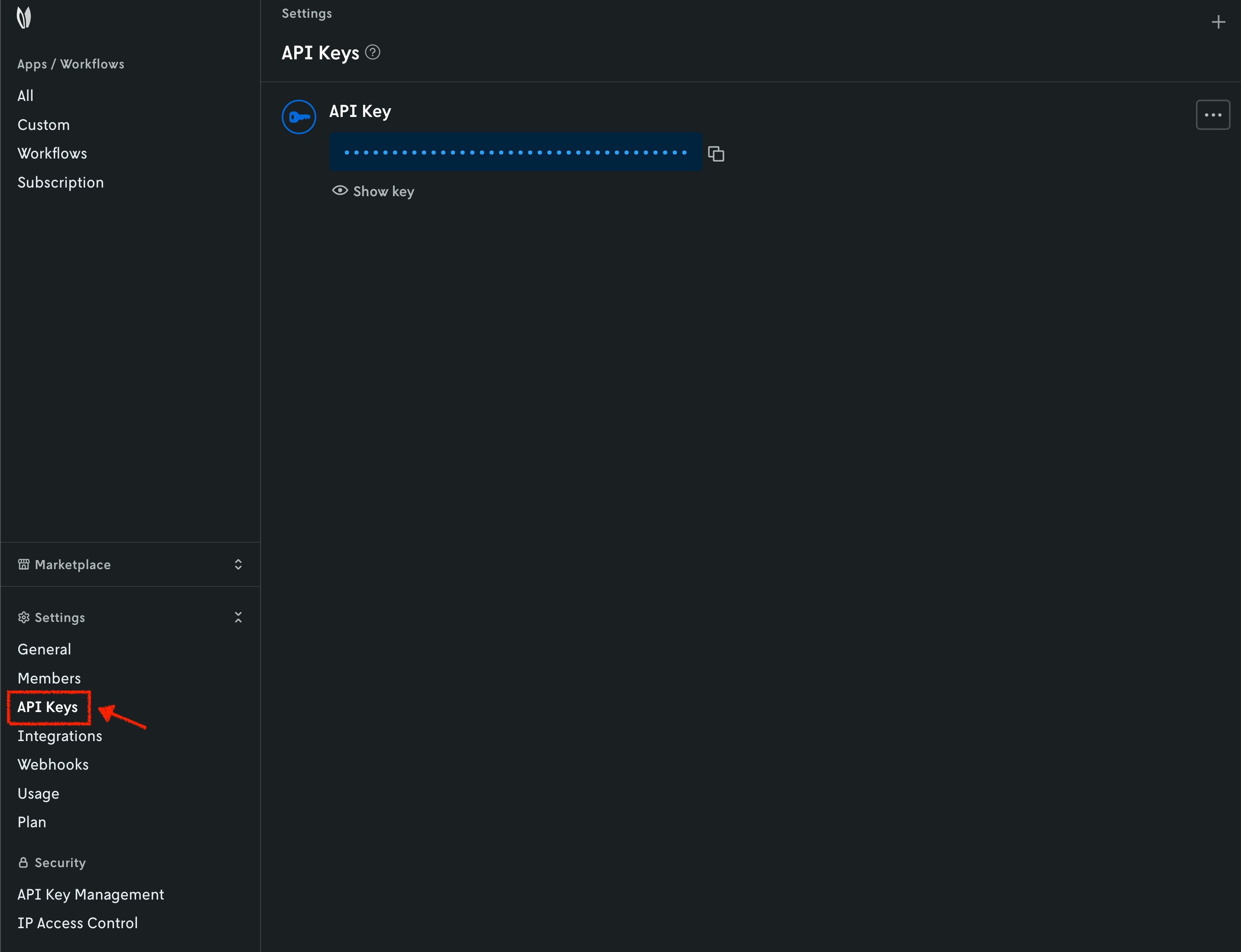
When you have your API key, it is convenient to save it as an environment variable so that you can use it for the rest of this tutorial.
7. Install the Nextmv CLI
Please see the Nextmv CLI installation guide.
8. Create your Nextmv Cloud application
At the root of your local project (where the app.yaml manifest is located),
run the following command:
⏳ Creating or getting application...
{
  "id": "test-ortools",
  "name": "test-ortools",
  "description": "",
  "type": "custom",
  "default_instance": "latest",
  "default_experiment_instance": "",
  "subscription_id": "",
  "locked": false,
  "created_at": "2025-12-01T23:00:46.289233Z",
  "updated_at": "2026-07-08T17:01:51.797601Z"
}
This will create a new application in Nextmv Cloud. Note that the name and app
ID can be different, but for simplicity this tutorial uses the same name and
app ID. This command is saved as app1.sh in the full tutorial
code. You can also create applications directly from
Nextmv Console.
You can go to the Apps section in the Nextmv Console where you will see your applications.
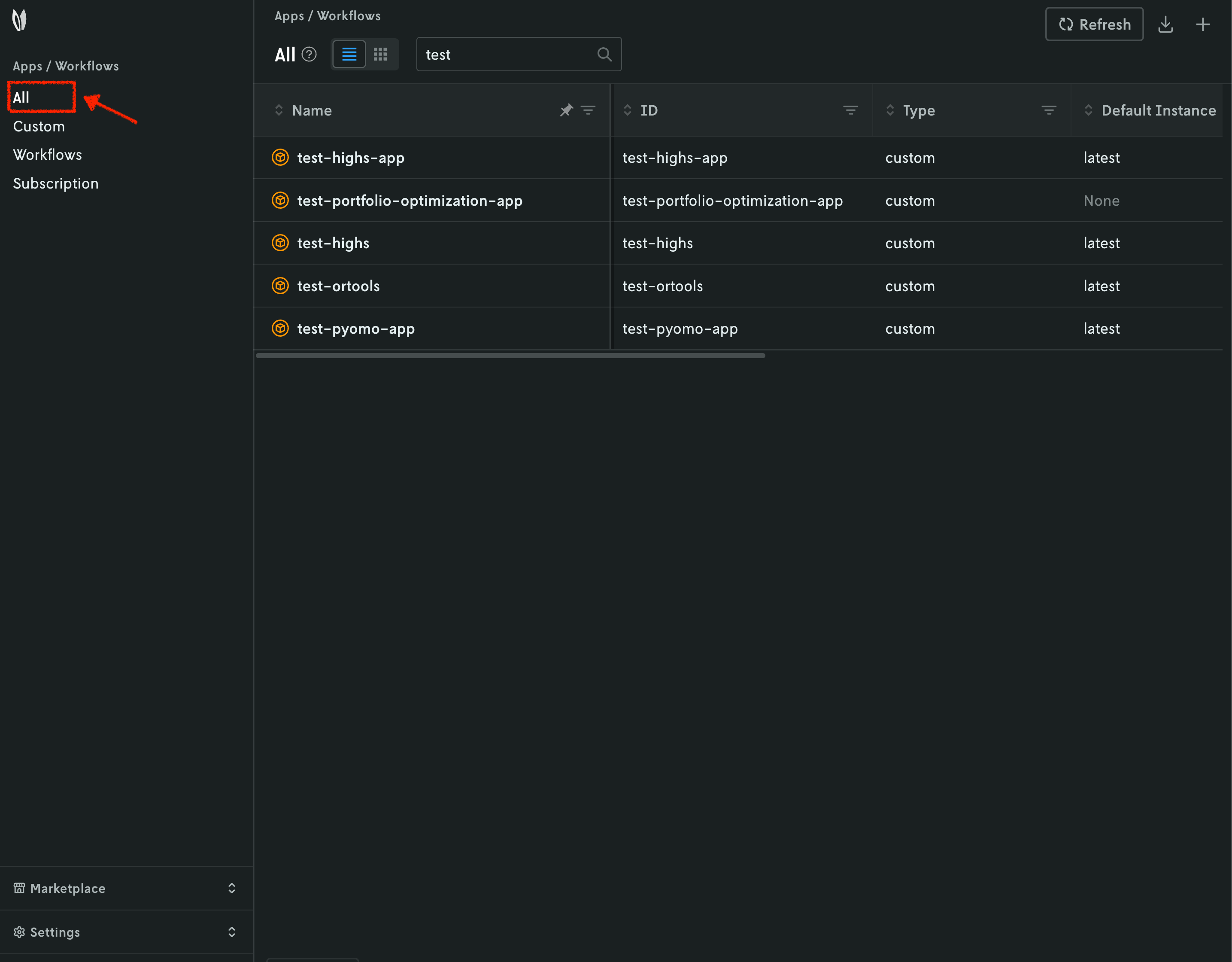
9. Push your Nextmv application
So far, your application has run locally. You are going to push your app to Nextmv Cloud. Once an application has been pushed, you can run it remotely, perform testing, experimentation, and much more. Pushing is the equivalent of deploying an application, this is, taking the executable code and sending it to Nextmv Cloud.
Deploy your app (push it) to Nextmv Cloud:
This command is saved as app2.sh in the full tutorial
code.
You can go to the Apps section in the Nextmv Console where you will see your application. You can click on it to see more details. Once you are in the overview of the application in the Nextmv Console, it should show the following:
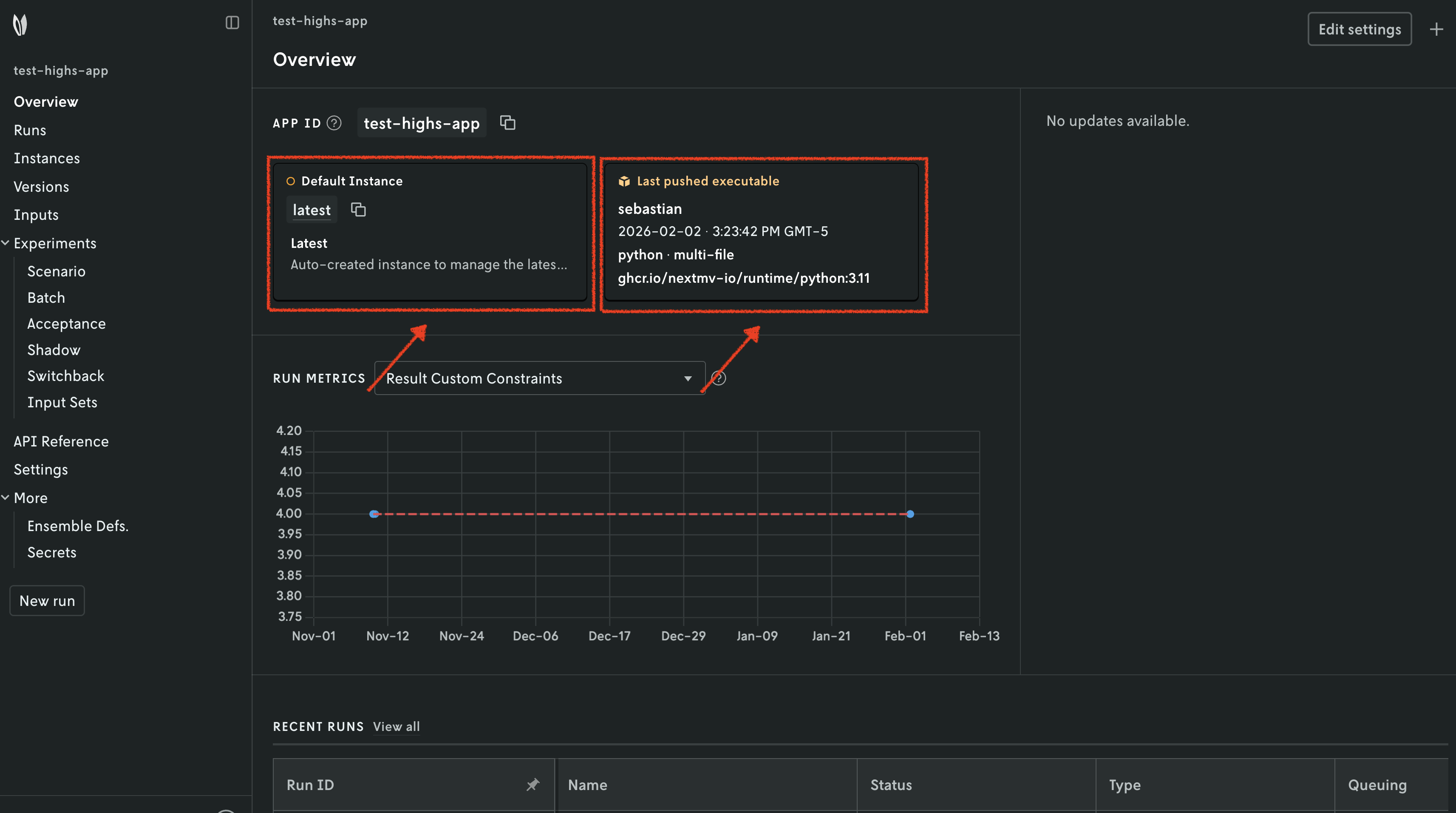
- There is now a pushed executable.
- There is an auto-created
latestinstance, assigned to the executable.
An instance is like the endpoint of the application.
10. Run the Nextmv application remotely
To run the Nextmv application remotely, you have several options. For this tutorial, we will be using the Nextmv Console and CLI.
For Xpress and OR-Tools, there are no special requirements to run. For HiGHS,
however, you need to specify the LD_LIBRARY_PATH environment variable, so
that the application can find the required shared libraries. To achieve this,
you can use secrets collections, which allow you to specify special files or
environment variables to be used when running your application.
Run the following command to create a secrets collection for HiGHS:
This command is saved as app3.sh in the full tutorial
code for the highs/nextmv-ified example.
Now you are ready to start a new run. In the Nextmv Console, in the app overview page:
- Press the
New runbutton. - Drop the data files that you want to use. You will get a preview of the
data.
- For Xpress, use the
input.jsonfile. - For HiGHS, use the
problem.jsonfile. - For OR-Tools, use the
distance.json,pickups_deliveries.json, andproblem.jsonfiles.
- For Xpress, use the
- Configure your run according to the options that are set in the
app.yamlmanifest.- For Xpress, you can configure the
duration. - For HiGHS, you can configure the
duration. - For OR-Tools, you can configure the
vehicle_maximum_travel_distanceand theglobal_span_cost_coefficient.
- For Xpress, you can configure the
- Configure the run settings.
- For HiGHS, select the secrets collection you created in the previous step.
- For Xpress and OR-Tools there is no special configuration needed.
- Start the run.
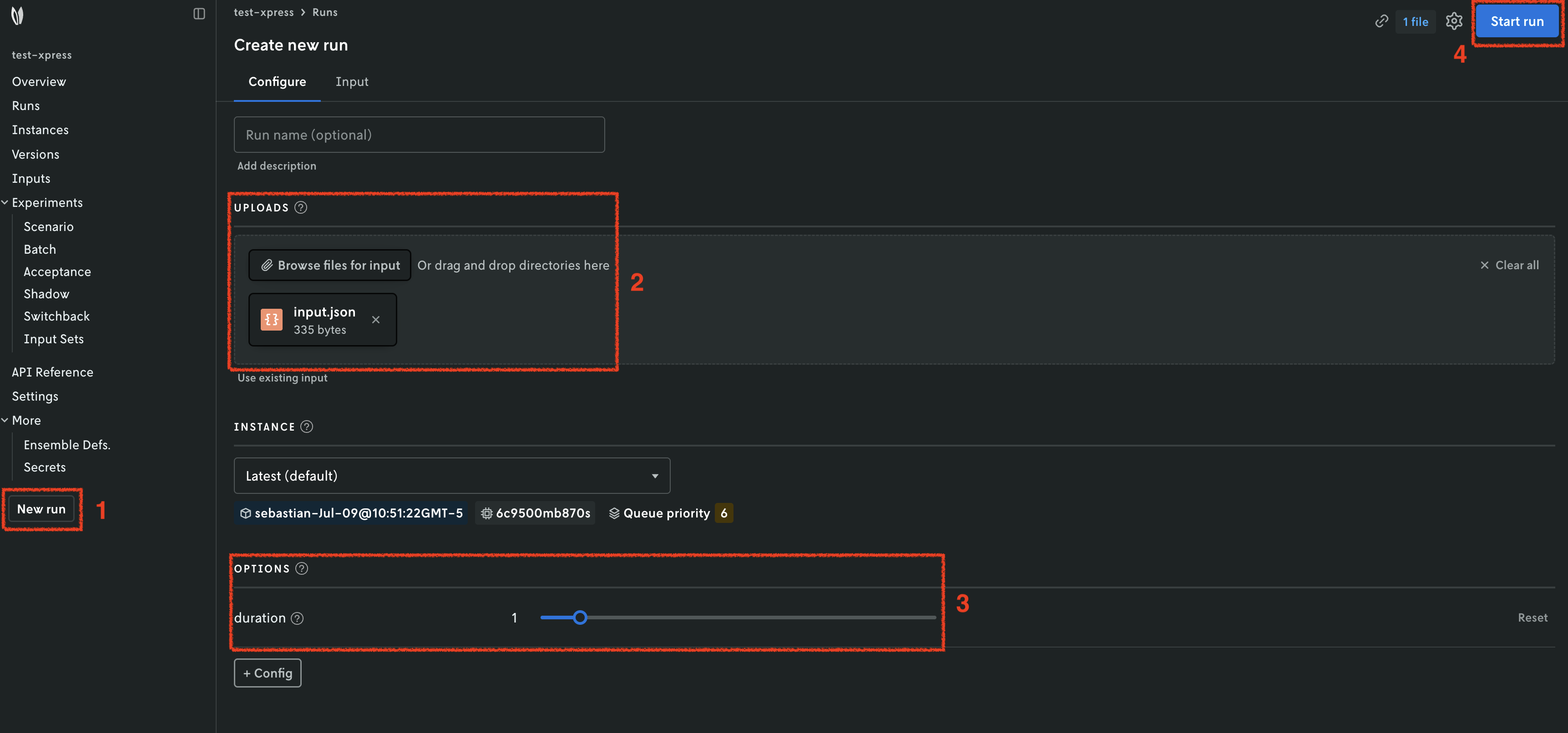
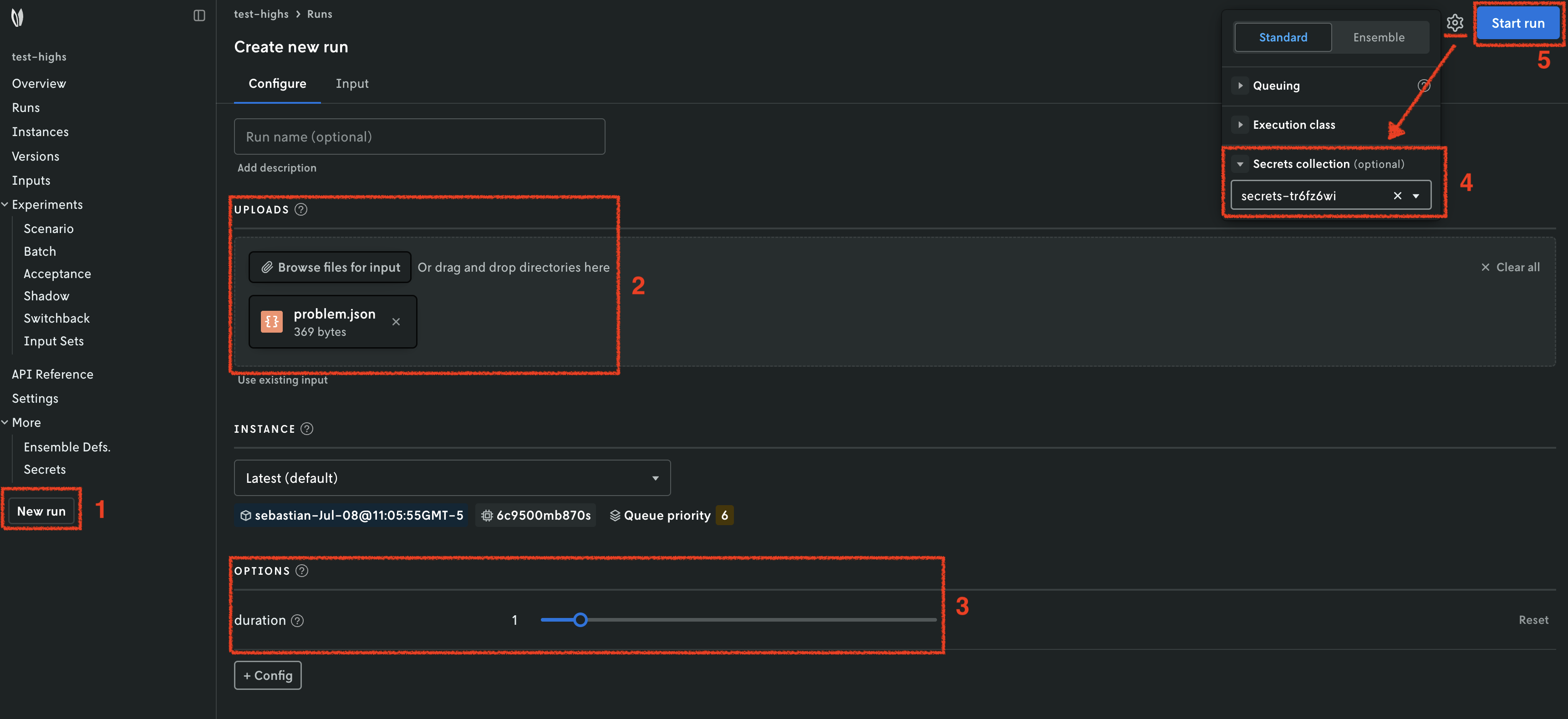
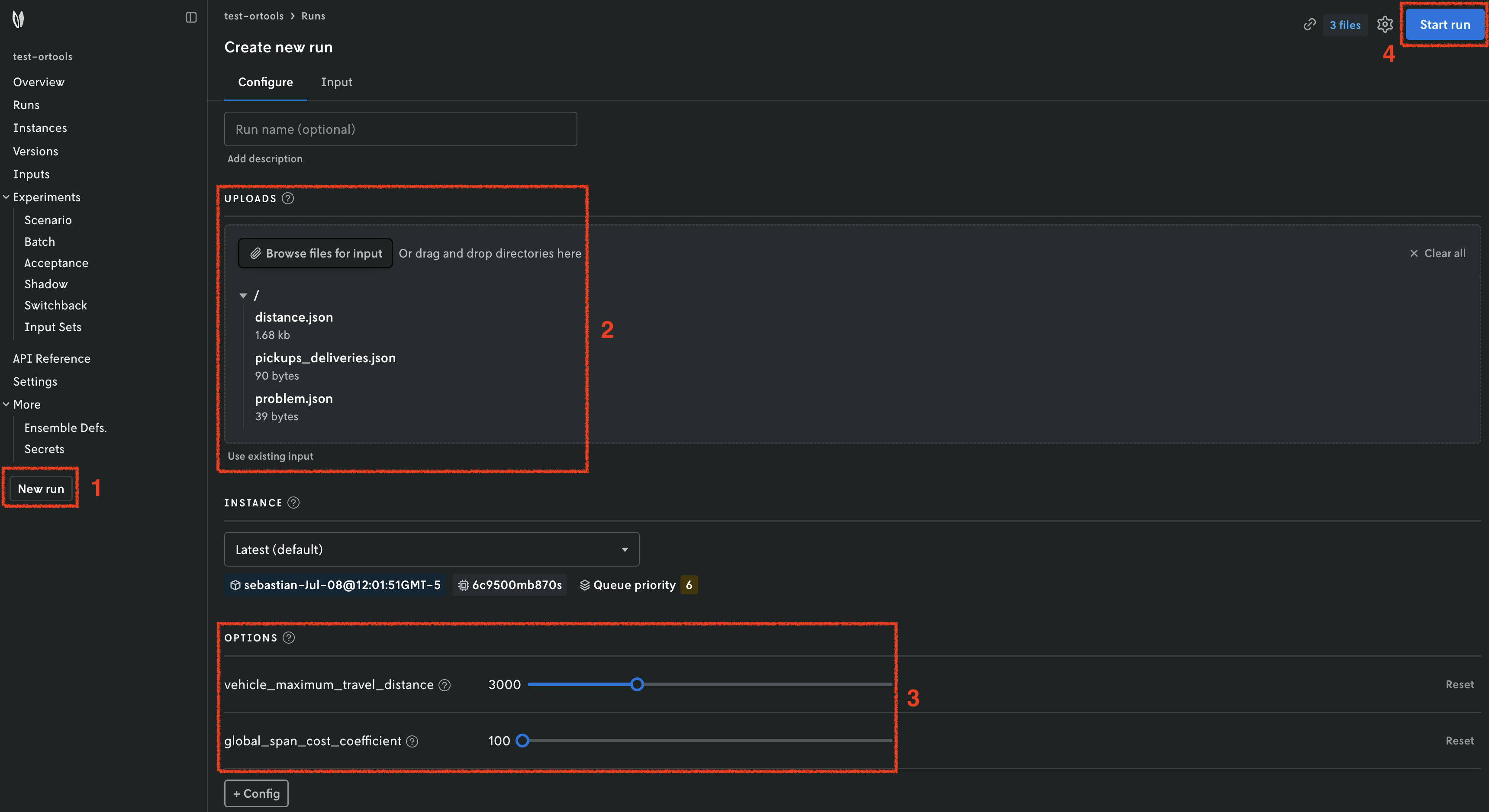
You can use the Nextmv Console to browse the information of the run:
- Summary
- Output
- Input
- Metadata
- Logs
Nextmv is built for collaboration, so you can invite team members to your account and share run URLs.
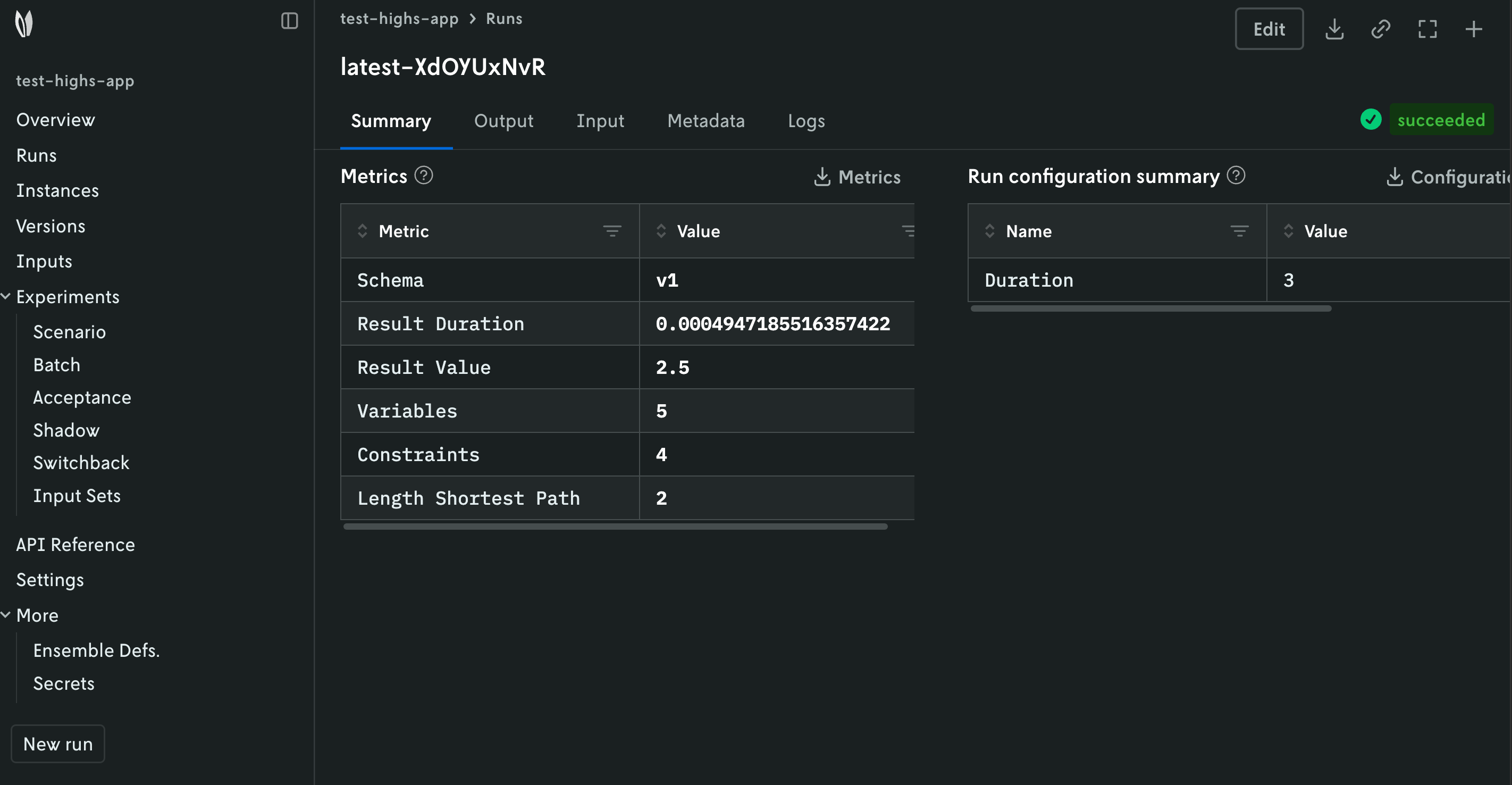
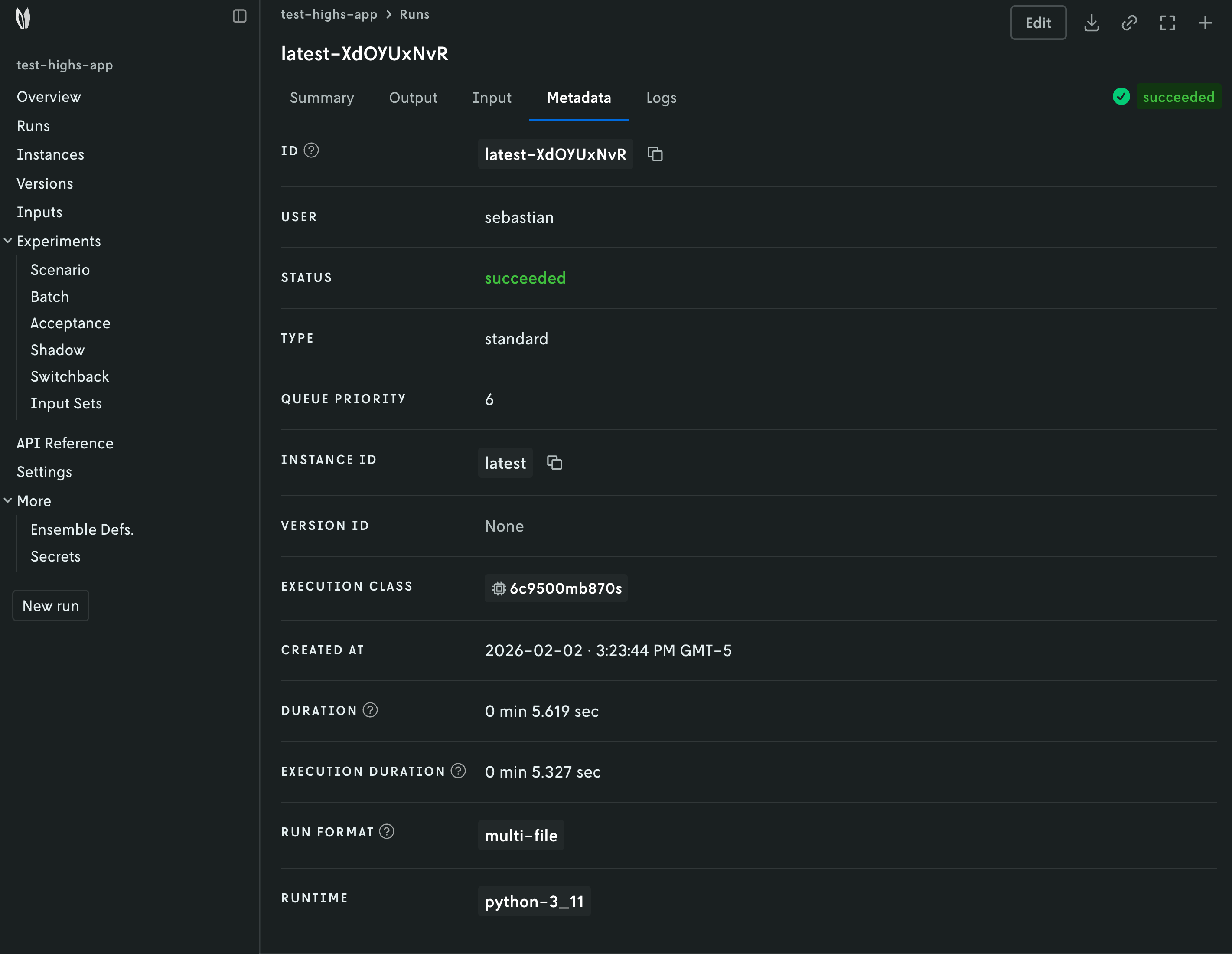
Alternatively, you can run your Nextmv application using the Nextmv CLI. Here is an example command for the applications.
This command is saved in the full tutorial code as:
app3.shfor Xpress and OR-Tools.app4.shfor HiGHS.
11. Perform a scenario test
We are going to take full advantage of the Nextmv Platform by creating a scenario test. Scenario tests are generally used as an exploratory test to understand the impacts to business metrics (or KPIs) on situations such as:
- Updating a model with a new feature, such as an additional constraint.
- Comparing how the same model performs in different conditions, such as low demand vs. high demand.
- Doing a sensitivity analysis to understand how the model behaves when changing a parameter.
Start by creating an input set. As the name suggests, it is a set of inputs, and it serves as a base so that we can perform runs varying one or more configurations (options). To create an input set, you have several options. For this tutorial, we will be using the Nextmv Console and CLI. You may follow these steps for all examples.
- Navigate to the
Input setssection. - Set a name for your input set.
- Use the
Instance + date rangecreation type given that we already have a few runs on thelatestinstance. - Create the input set.
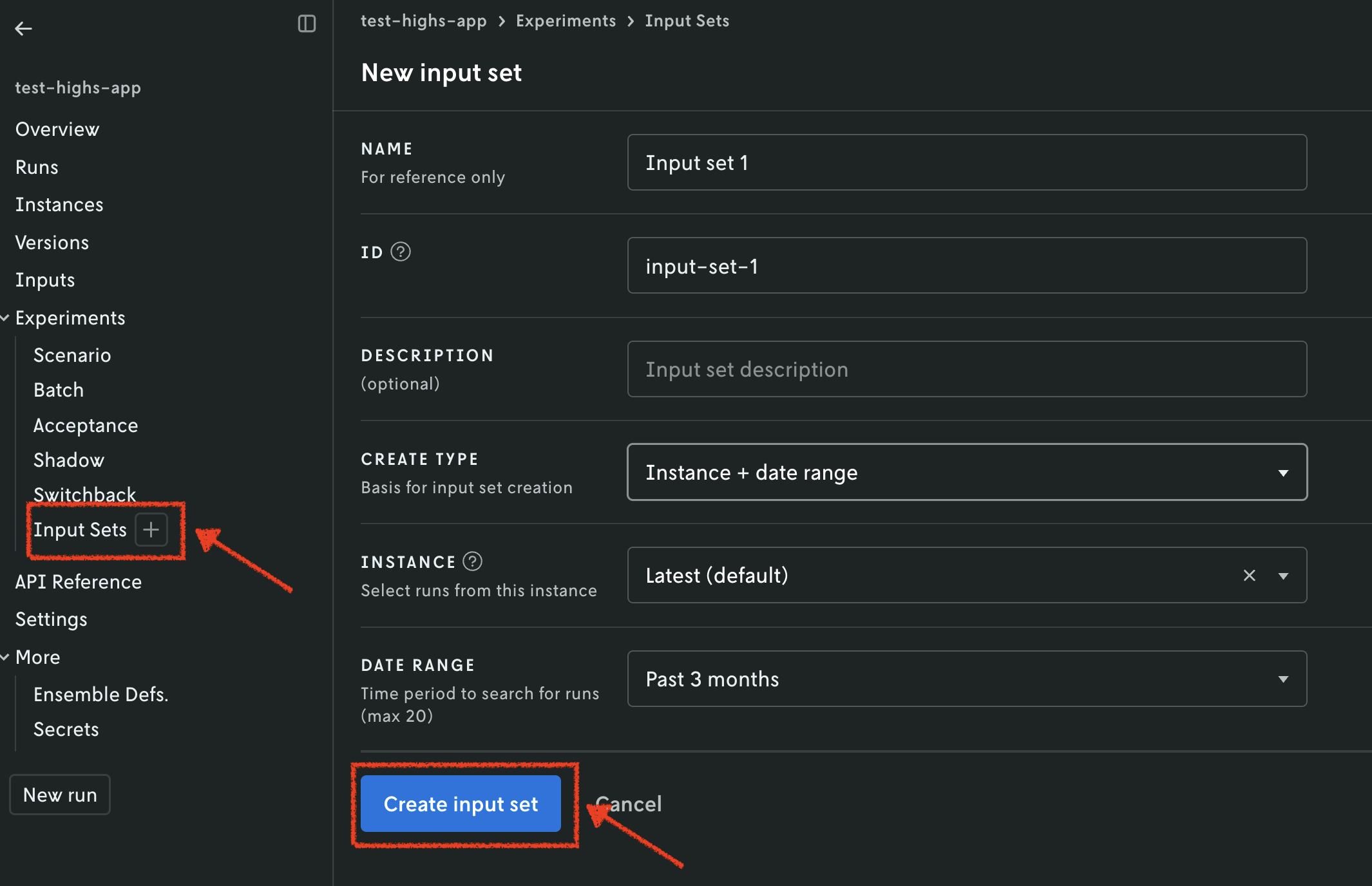
Another option for creating the input set is using the Nextmv CLI. Here is an example command for the applications.
This command is saved in the full tutorial code as:
app4.shfor Xpress and OR-Tools.app5.shfor HiGHS.
Before creating the scenario test, we need to make sure that the secrets (the
environment variable) are available for the HiGHS app. To do this, we are going
to update the latest instance to use the secrets collection we created
before.
Run the following command to update the latest instance for HiGHS:
⏳ Updating instance...
✅ Instance latest updated successfully in application test-highs.
{
  "id": "latest",
  "application_id": "test-highs",
  "version_id": "",
  "name": "Latest",
  "description": "Auto-created instance to manage the latest pushed executable binary.",
  "configuration": {
    "execution_class": "6c9500mb870s",
    "secrets_collection_id": "secrets-tr6fz6wi",
    "queuing": {
      "priority": 6,
      "disabled": false
    }
  },
  "locked": false,
  "created_at": "2025-12-01T23:02:31.269239Z",
  "updated_at": "2026-07-10T14:32:18.043814Z"
}
This command is saved as app6.sh in the full tutorial
code for the highs/nextmv-ified example.
Once your input set has been created, and the latest instance has been
updated, we are going to create a scenario test. Similarly to runs and input
sets, you may use the Console or CLI, amongst other options. We will continue
to use both in this tutorial. You may follow these steps for all examples.
- Navigate to the
Scenariosection. - Set a name for your scenario test.
- Select the input set you just created in the previous step.
- Select the
latestinstance. - Create configuration combinations, which will be factored in to create the
scenarios.
- For Xpress, we are setting
durationto be 1, 3, and 5 seconds. - For HiGHS, we are setting
durationto be 1, 3, and 5 seconds. - For OR-Tools, we are setting
vehicle_maximum_travel_distanceto be 3000, 2500, and 2000; andglobal_span_cost_coefficientto be 100, and 1000.
- For Xpress, we are setting
- Optionally, you may configure repetitions. These are useful when the results are not deterministic.
- Create the scenario test. Review and confirm the number of scenarios that will be created.
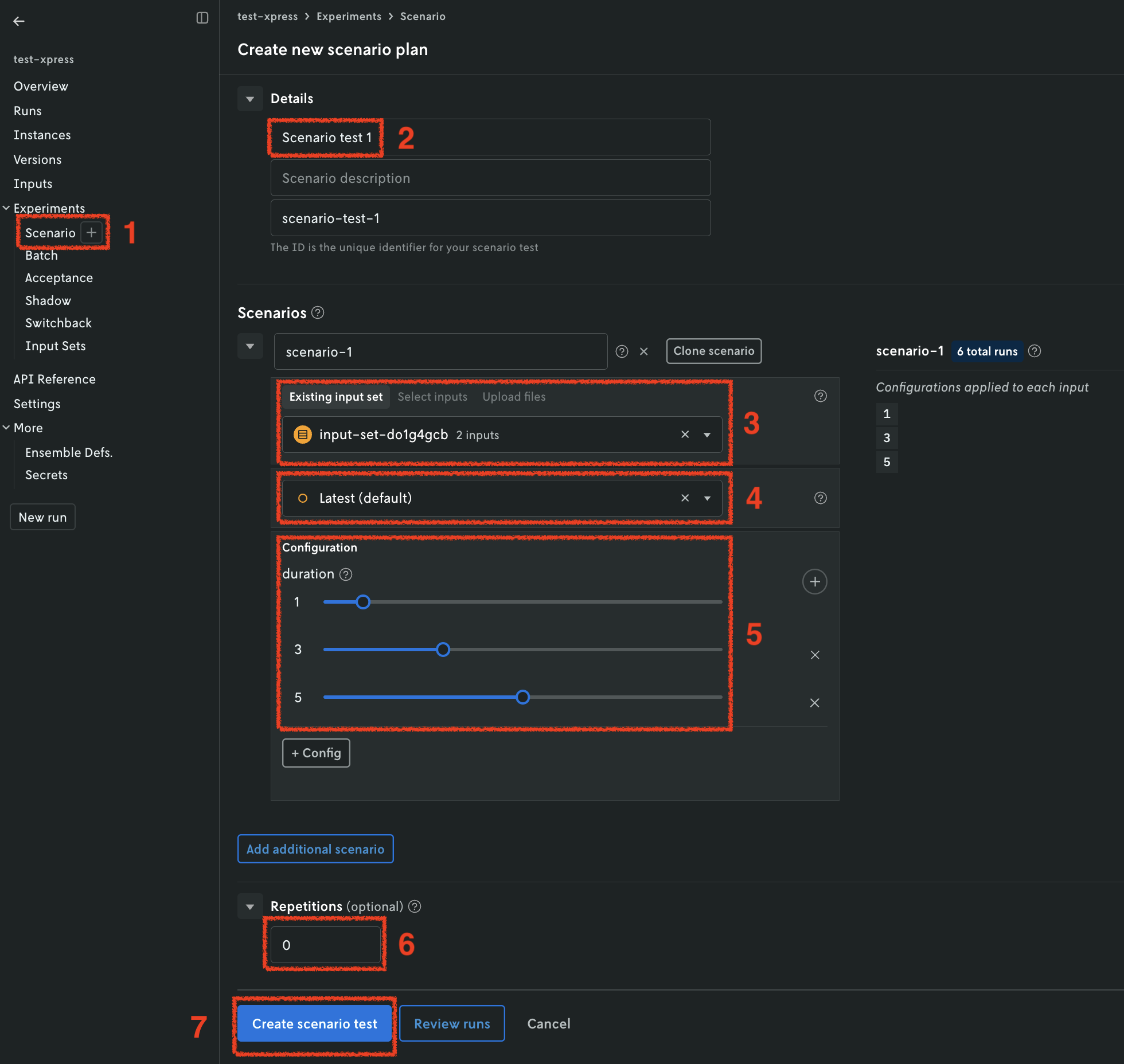
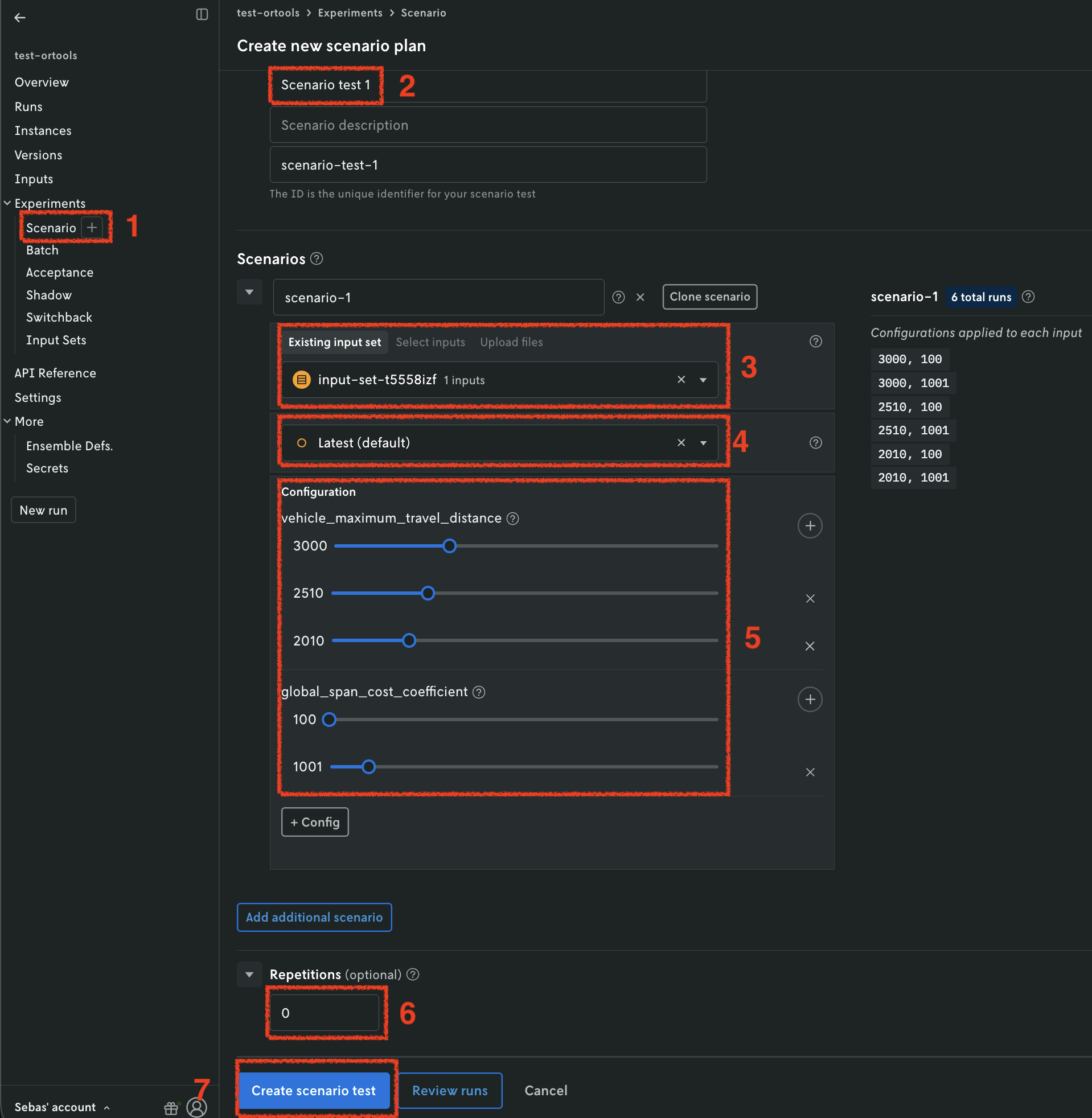
Once all the runs in the scenario test are completed, you can visualize the result of the test. A pivot table is provided to create useful comparisons of your metrics across the scenario test runs.
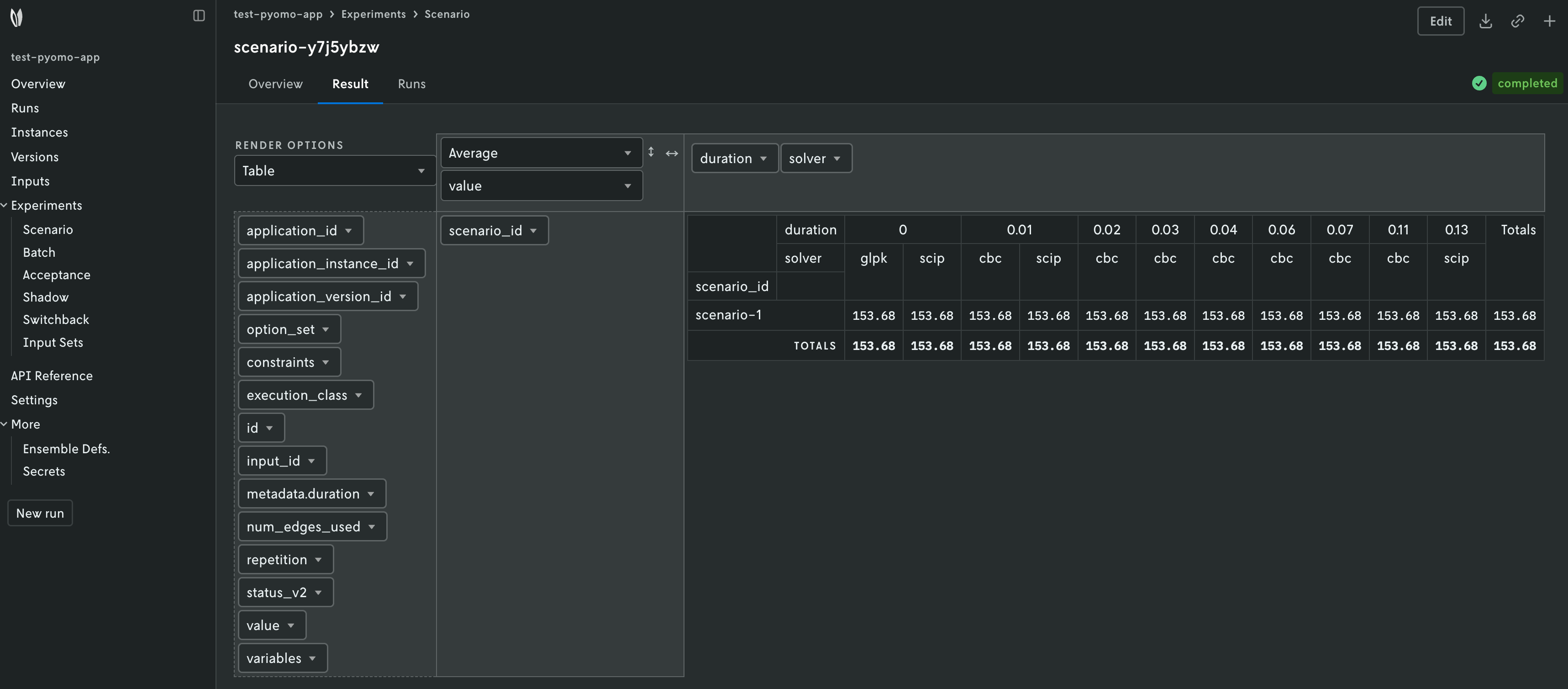
Another option for creating the scenario test is using the Nextmv CLI. Here is an example command for the applications.
SCENARIO='{
    "instance_id": "latest",
    "scenario_input": {
        "scenario_input_type": "input_set",
        "scenario_input_data": "<INPUT_SET_ID_CREATED_PREVIOUSLY>"
    },
    "configuration": [
        {
            "name": "vehicle_maximum_travel_distance",
            "values": ["3000", "2500", "2000"]
        },
        {
            "name": "global_span_cost_coefficient",
            "values": ["100", "1000"]
        }
    ]
}'
nextmv cloud scenario create -a test-ortools --scenarios "$SCENARIO"
This command is saved in the full tutorial code as:
app5.shfor Xpress and OR-Tools.app6.shfor HiGHS.
🎉🎉🎉 Congratulations, you have finished this tutorial!
Full tutorial code
You can find the consolidated code examples used in this tutorial in the
tutorials GitHub repository. The
connect-your-model-cli dir contains all the
code that was shown in this tutorial.
For each of the examples, you will find two directories:
original: the original example without any modifications.nextmv-ified: the example converted into a Nextmv application.
Go into each directory for instructions about running the decision model.